

Show Plugin File Path & Size
Find plugin file locations and sizes directly from your WordPress dashboard.
Need to locate a plugin’s files or check how much space it occupies? Get useful file path and size information directly in your WordPress administration area without manually browsing your server’s directories.
A practical tool for developers, website administrators, and WordPress users who want better visibility into their installed plugins.
Key highlights:
- Display plugin file path information.
- View plugin file size details.
- Find plugin locations more conveniently.
- Simplify routine WordPress maintenance and troubleshooting.
- No external APIs or third-party services required.
Choose Your License
1 Year / 1 Site
Use on 1 website for 1 year.
$0.99
1 Year / 10 Sites
Use on up to 10 websites for 1 year.
$6.99
Lifetime / 1 Site
One time payment. Use on 1 website forever.
$6.99
Secure Checkout
Instant Download
24/7 Email Support
Plugin Details
| Version | 1.0.0 |
| Total File Size | 54.2 KB |
| Last Updated | Oct 28, 2026 |
| Requires WordPress | 6.0+ |
| Requires PHP | 7.4+ |
| Compatible With | WordPress, WooCommerce, Elementor & Contact Form 7 |
| Support | 24/7 Email Support |
View Plugin File Paths
See the installation path of every plugin directly from your WordPress Plugins list.
Display Plugin File Sizes
Quickly identify how much storage space individual plugins occupy.
Main PHP File Information
View the exact location of each plugin’s main PHP file.
Total Plugin Folder Size
See the combined size of the plugin folder, including its files and subdirectories, for plugins installed in their own folders.
Instant Plugin Overview
Access plugin path and size information without opening individual plugin settings or browsing server directories.
One-Click Enable or Disable
Show or hide the additional plugin information columns whenever you need them.
Description
Show Plugin File Path & Size is a lightweight WordPress plugin that adds useful file location and storage information directly to your WordPress Plugins administration screen.
Managing a WordPress website often involves installing multiple plugins, troubleshooting compatibility issues and monitoring server storage usage. However, WordPress does not normally display the actual installation paths or file sizes of individual plugins in its standard Plugins list.
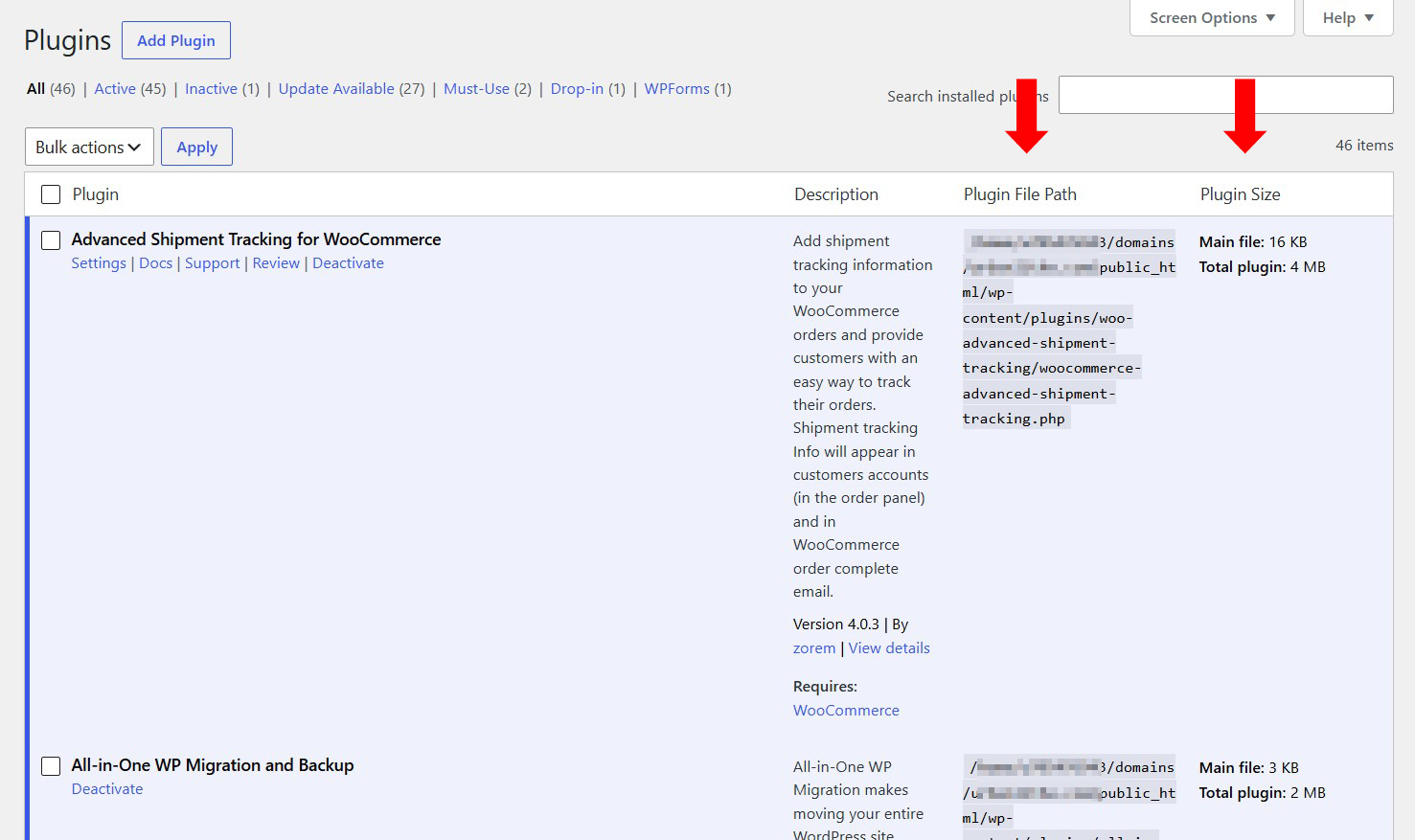
This plugin solves that problem by adding two additional columns to your Plugins screen: Plugin File Path and Plugin Size.
The Plugin File Path column displays the location of each plugin’s main PHP file, helping you quickly identify where a plugin is installed on your server.
The Plugin Size column displays the size of the plugin’s main PHP file. For plugins installed in their own folders, it also displays the total size of the plugin folder, including its files and subdirectories.
Whether you are a WordPress administrator, developer or website owner, having this information readily available makes plugin management and troubleshooting more convenient.
There is no need to access FTP, hosting file managers or server directories just to identify a plugin’s file location or check its size.
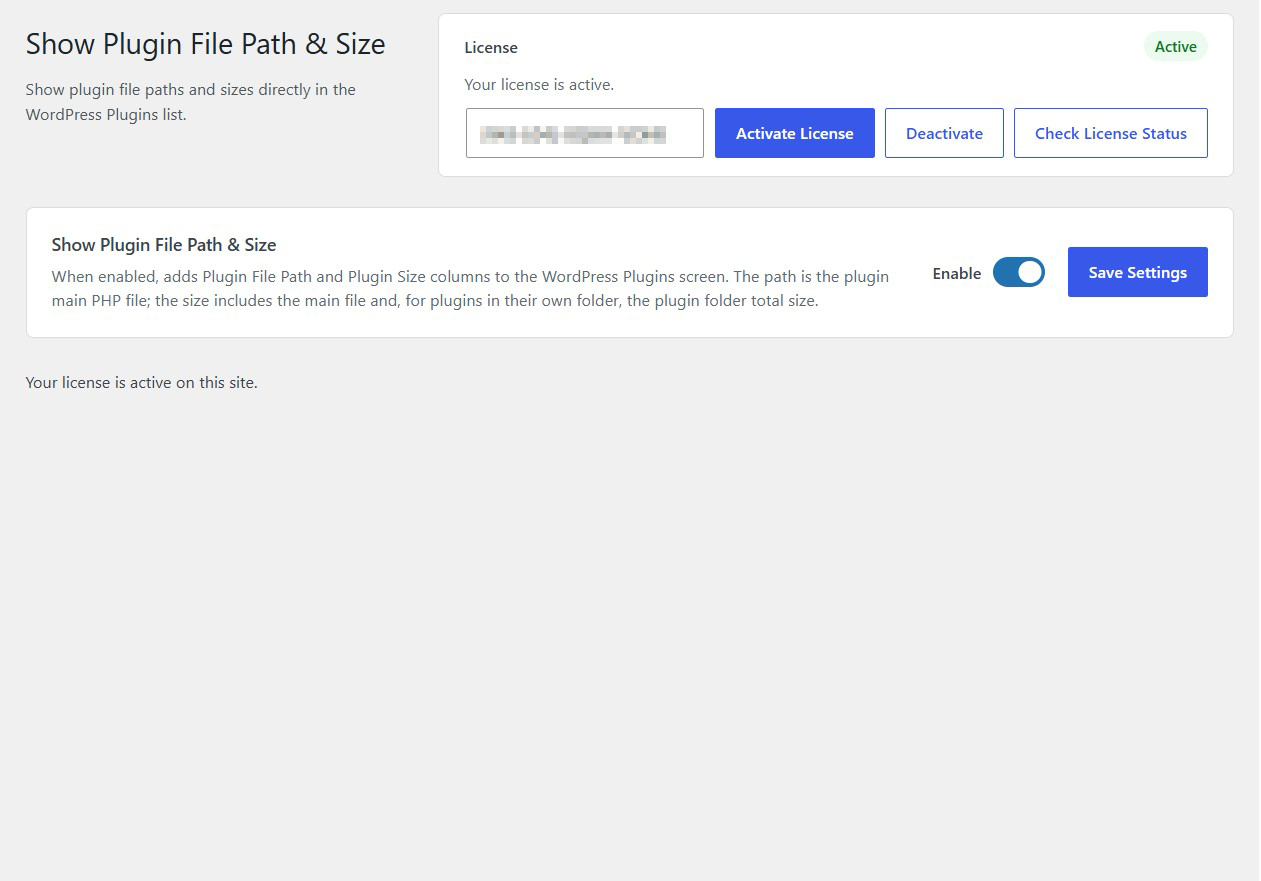
Simply enable the plugin, save your settings and visit your WordPress Plugins page.
All additional information appears directly alongside your installed plugins, making it easier to inspect your website’s plugin installation at a glance.
Simple, practical and lightweight. Show Plugin File Path & Size gives you more visibility into your WordPress plugins without adding unnecessary complexity.
Key Features
- Display plugin file paths in the WordPress Plugins list
- Display plugin main PHP file locations
- Show the size of individual plugin main files
- Display total plugin folder sizes
- Include files and subdirectories in folder size calculations
- Add dedicated Plugin File Path and Plugin Size columns
- View plugin information without accessing FTP
- Simple centralized settings screen
- Lightweight and easy to use
- No external services or API keys required
Frequently Asked Questions
Where can I see the plugin information?
You can find the additional information directly on your WordPress administration Plugins page, alongside your installed plugins.
What does the Plugin File Path column display?
It displays the location of the plugin’s main PHP file on your WordPress installation.
What does the Plugin Size column display?
It displays the size of the plugin’s main PHP file. For plugins installed in their own folders, it also displays the total size of the plugin folder.
Does the total plugin size include subdirectories?
Yes. For plugins installed in their own folders, the total size includes the main plugin file and the files contained within the plugin folder and its subdirectories.
Do I need FTP access to see plugin file paths?
No. The plugin displays the information directly in your WordPress administration area, eliminating the need to access FTP or your hosting file manager just to locate plugin files.
Can I use it to identify large plugins?
Yes. The displayed file sizes can help you identify plugins with larger file footprints and better understand how your installed plugins use storage space.
Will it affect my installed plugins?
No. It is designed to display additional information without changing how your existing plugins operate.
Does the plugin require external services?
No. It works directly within your WordPress installation without external services, API keys or third-party connections.
Related Plugins

Disable Plugin Notifications
Hide plugin-generated administration notices throughout your WordPress dashboard and reduce unnecessary distractions.

Disable Admin Notices
Hide standard WordPress administration notices and maintain a cleaner, more organized dashboard.

Disable Theme Updates
Control theme update availability and prevent WordPress from offering theme updates while enabled.