
Hide WP-Login Page From Public
Keep your default WordPress login URL out of public view.
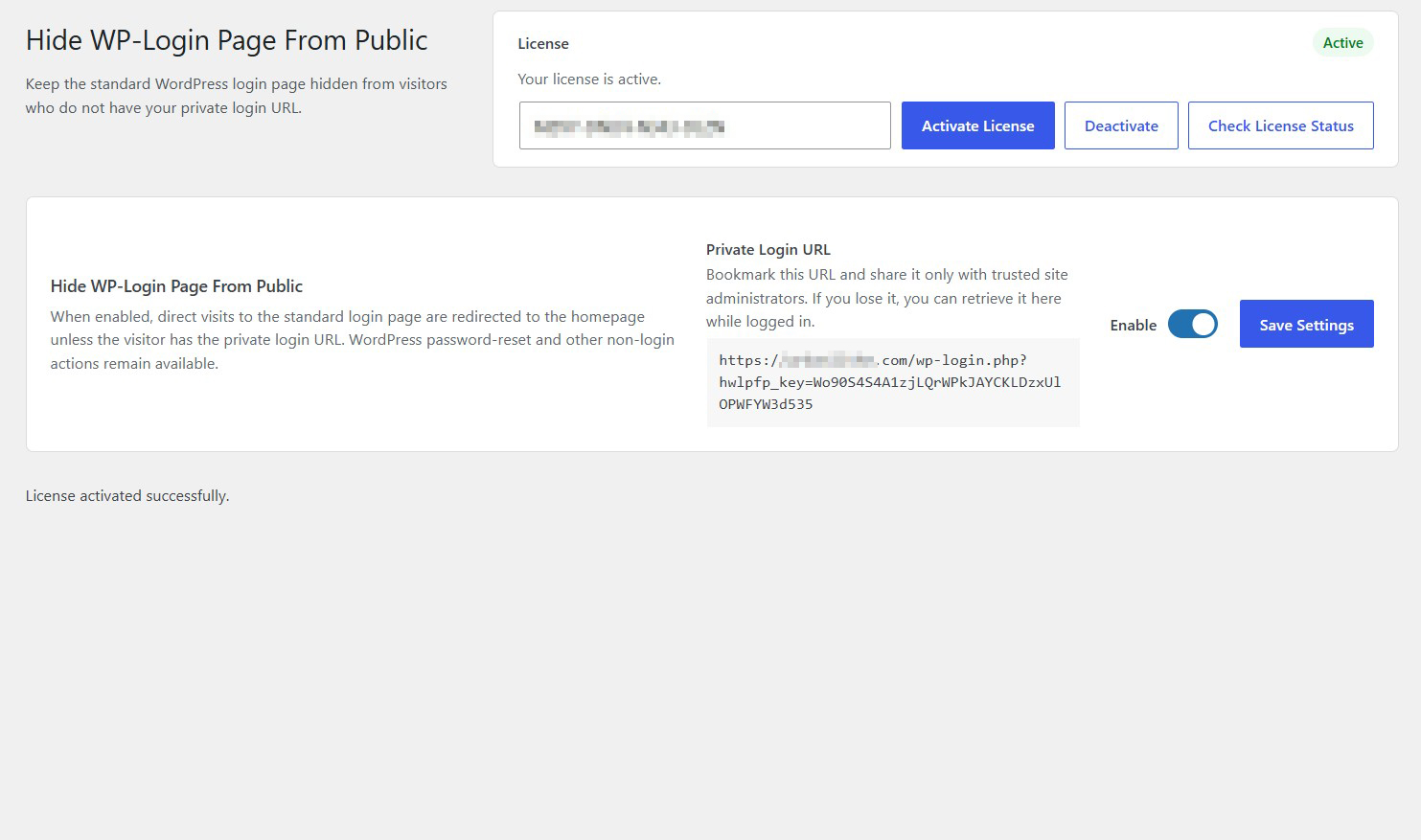
Replace the familiar /wp-login.php address with a custom login URL and make the default login page inaccessible to visitors who don’t know your new address.
A simple, lightweight way to make your WordPress login page less obvious — without complicated security settings.
Key highlights:
- Set a custom URL for your WordPress login page.
- Restrict access through the default login URL.
- Keep your login address private and easy to manage.
- Configure your login URL from your WordPress dashboard.
- No external services or API subscriptions required.
- A focused tool that does one job without unnecessary complexity.
Choose Your License
1 Year / 1 Site
Use on 1 website for 1 year.
$2.99
1 Year / 10 Sites
Use on up to 10 websites for 1 year.
$12.99
Lifetime / 1 Site
One time payment. Use on 1 website forever.
$9.99
Secure Checkout
Instant Download
24/7 Email Support
Plugin Details
| Version | 1.0.0 |
| Total File Size | 53.7 KB |
| Last Updated | Oct 28, 2026 |
| Requires WordPress | 6.0+ |
| Requires PHP | 7.4+ |
| Compatible With | WordPress, WooCommerce, Elementor & Contact Form 7 |
| Support | 24/7 Email Support |
Hide the Default Login Page
Make your standard WordPress login URL inaccessible to visitors.
Private Admin Login URL
Access your WordPress dashboard through your own private login link.
Redirect Unauthorized Visitors
Automatically redirect visitors trying to access the default login page to your homepage.
Keep Your Login Private
Prevent casual visitors and bots from discovering your standard WordPress login page.
Simple Configuration
Create your private login URL in just one click, without complicated settings.
One-Click Control
Enable or disable the protection whenever you need it, directly from one convenient settings screen.
Description
Hide WP-Login Page From Public helps protect your WordPress website by hiding the default login page from public access.
Instead of allowing visitors to access the standard WordPress login URL, you can use a private login URL of your choice. Anyone attempting to visit the default login page will automatically be redirected to your website’s homepage.
You can continue accessing your WordPress dashboard normally through your private login link, while keeping the standard login address hidden from visitors and automated login attempts.
Easy to configure and lightweight, this plugin provides a simple additional layer of obscurity for your WordPress login page without requiring external services or complicated configurations.
Key Features
- Hide the default WordPress login page
- Create a private login URL for administrators
- Redirect visitors accessing the default login page to your homepage
- Keep your private login URL separate from the public website
- Simple and straightforward configuration
- Lightweight with no external services required
Frequently Asked Questions
Does this completely secure my WordPress website?
No. Hiding the default login URL can make it less obvious, but it is not a complete security solution. Continue using strong passwords, keep WordPress updated, and use appropriate additional security measures.
Can I choose my own login URL?
Yes. You can configure a custom login path instead of using the standard WordPress login address.
What happens when someone visits /wp-login.php?
The plugin is designed to restrict access through the default login URL. It redirects users to the homepage.
Will my WordPress dashboard still work?
Yes, provided you access the login process through the configured URL and the plugin is compatible with your site’s login setup. Test the new address before ending your existing administrator session.
What if I forget my custom login URL?
Keep a secure record of your custom URL. If you lose access, you may need to disable the plugin through your hosting file manager or FTP to restore the default login route. The exact recovery procedure will depend on your installation.
Will password resets still work?
Password-reset functionality needs to be tested with the plugin’s custom login routing and any other login-related plugins installed on your website.
Does it work with WooCommerce or membership plugins?
Compatibility depends on how each plugin handles login, registration, and password-reset requests. Check the published compatibility list for supported integrations.
Does it require an external API?
No external API is required for the core login URL functionality.
Can I use it on client websites?
Yes. You can use the plugin on your own websites and client websites within the site limit of your purchased license.
Related Plugins

Block This Email & Domain
Prevent unwanted email addresses and entire domains from registering, logging in or submitting forms.