

Custom CSS/PHP/JS Snippets
Add custom code to your WordPress website without editing theme files.
Customize your WordPress website with your own CSS, PHP, and JavaScript snippets. Custom CSS/PHP/JS Snippets gives you a centralized place to manage code customizations, helping you keep your changes organized and easier to maintain.
Key highlights:
- Add custom CSS, PHP, and JavaScript snippets
- Manage code from your WordPress dashboard
- Keep customizations separate from theme files
- Organize website modifications in one place
- Reduce the need to edit theme files directly


Choose Your License
1 Year / 1 Site
Use on 1 website for 1 year.
$0.99
1 Year / 10 Sites
Use on up to 10 websites for 1 year.
$6.99
Lifetime / 1 Site
One time payment. Use on 1 website forever.
$9.99
Secure Checkout
Instant Download
24/7 Email Support
Plugin Details
| Version | 1.0.5 |
| Total File Size | 208 KB |
| Last Updated | Oct 28, 2026 |
| Requires WordPress | 6.0+ |
| Requires PHP | 7.4+ |
| Compatible With | WordPress, WooCommerce, Elementor & Contact Form 7 |
| Support | 24/7 Email Support |
Manage Custom Code in One Place
Create, edit and organize custom CSS, PHP and JavaScript snippets directly from your WordPress administration dashboard.
Three Supported Code Types
Add custom CSS for styling, PHP for WordPress functionality and JavaScript for interactive website features.
Individual Snippet Management
Give each snippet its own name and manage it independently, making it easier to organize multiple custom code additions.
Enable or Disable Snippets Instantly
Control individual snippets using their dedicated status toggles without deleting or modifying their code.
Integrated Code Editor
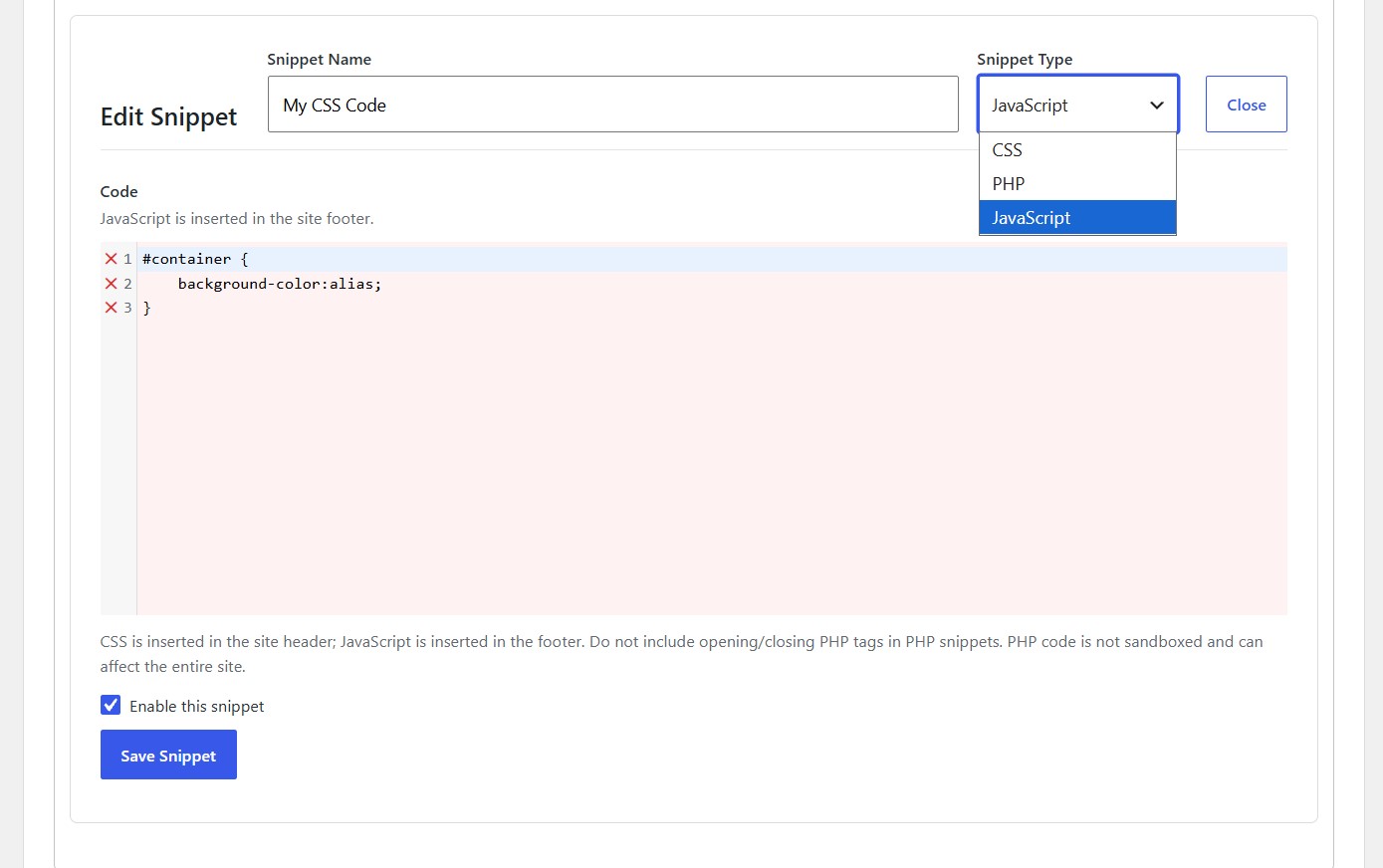
Write and edit your snippets directly within the plugin’s built-in code editor, with syntax highlighting and line numbering.
License-Based Code Execution
Enabled snippets run only while your WP Actions license is active, providing license-controlled access to your custom code.
Description
Custom CSS/PHP/JS Snippets is a lightweight WordPress plugin that allows you to create, manage and execute custom code directly from your WordPress administration dashboard.
Whether you need to customize your website’s appearance, add specific functionality or implement custom JavaScript behavior, this plugin provides a centralized place to manage your code without manually editing your theme’s files.
Instead of modifying your theme’s functions.php file, editing template files or maintaining separate code snippets, you can manage everything through one simple interface.
Three Supported Code Types
The plugin supports three different types of custom code:
CSS: Add custom styling to your website. CSS snippets are automatically inserted into your website’s header.
PHP: Add custom PHP functionality and WordPress code. PHP snippets execute within your WordPress environment and must not include opening or closing PHP tags.
JavaScript: Add custom scripts and interactive functionality. JavaScript snippets are automatically inserted into your website’s footer.
Centralized Snippet Management
Create multiple snippets and manage each one independently.
Every snippet has its own name, code type, content and activation status. The main dashboard displays your saved snippets in an organized table, allowing you to quickly identify and manage your custom code.
Individual Enable and Disable Controls
Each snippet includes its own status toggle, allowing you to enable or disable its execution without deleting the saved code.
This makes it easy to temporarily disable a customization, test changes or restore previously saved functionality whenever needed.
Integrated Code Editor
Write and edit your custom code directly within the plugin interface using its built-in code editor.
The editor provides syntax highlighting and line numbering to make working with CSS, PHP and JavaScript easier.
License-Controlled Execution
Custom snippets run only while your WP Actions license is active. Only enabled snippets are executed.
If your license becomes inactive, your saved snippets remain manageable, but their code is not executed.
Simple and Organized Interface
The plugin provides a straightforward administration interface where you can:
Create new snippets.
Choose between CSS, PHP and JavaScript.
Give each snippet a descriptive name.
Write or modify custom code.
Enable or disable individual snippets.
Edit existing snippets.
Delete snippets you no longer need.
Whether you are a developer, website administrator or WordPress enthusiast, Custom CSS/PHP/JS Snippets provides a convenient way to manage website customizations without constantly modifying your theme files.
Keep your custom WordPress code organized, accessible and easy to manage from one place.
Key Features
- Create and manage multiple custom code snippets
- Support for CSS, PHP and JavaScript
- Individual snippet names and descriptions through their titles
- Built-in code editor
- Syntax highlighting
- Line numbering
- Automatic CSS insertion into the website header
- Automatic JavaScript insertion into the website footer
- PHP code execution within WordPress
- Individual enable and disable controls
- Edit existing snippets at any time
- Delete unwanted snippets
- Display snippet types and activation statuses
- License-controlled snippet execution
- Only enabled snippets execute
- Saved snippets remain available for future use
Frequently Asked Questions
Which programming languages does the plugin support?
The plugin supports CSS, PHP and JavaScript.
Where is custom CSS inserted?
CSS snippets are automatically inserted into your website’s header.
Where is custom JavaScript inserted?
JavaScript snippets are automatically inserted into your website’s footer.
How are PHP snippets executed?
PHP snippets execute within your WordPress environment. They do not require opening or closing PHP tags.
Can I create multiple snippets?
Yes. You can create and manage multiple independent snippets, each with its own name, code type, content and activation status.
Can I temporarily disable a snippet without deleting it?
Yes. Each snippet has an individual enable/disable toggle. Disabling a snippet stops its execution while preserving its saved code.
Can I edit an existing snippet?
Yes. Use the Edit button next to the snippet you want to modify.
Can I delete snippets I no longer need?
Yes. Each saved snippet includes a Delete action.
Does the plugin include a code editor?
Yes. The plugin includes an integrated code editor with syntax highlighting and line numbering.
Do snippets execute automatically after creation?
Only snippets marked as enabled are executed. You can also choose whether to enable a snippet when creating or editing it.
What happens if my WP Actions license expires?
Your saved snippets remain stored, but their code will not execute while your license is inactive.
Can I use this plugin to customize my WordPress theme?
Yes. You can use CSS to modify styling, PHP to add functionality and JavaScript to implement interactive features.
Is PHP code sandboxed?
No. PHP snippets execute within the WordPress environment and are not sandboxed. Incorrect or malicious PHP code can affect your entire website. Only add PHP code that you trust and understand.
Can incorrect CSS or JavaScript affect my website?
Yes. Incorrect code can cause visual problems, JavaScript errors or unexpected website behavior. Test your snippets carefully before enabling them on a production website.
Related Plugins

Disable Admin Notices
Hide standard WordPress administration notices throughout your dashboard.

Disable Plugin Notifications
Hide plugin-generated administration notices for a cleaner WordPress dashboard.

Remove WordPress Generator
Remove WordPress generator version metadata from your website.