

New User Report
Get a clearer overview of new user registrations on your WordPress website.
Keep track of user registrations without manually reviewing your entire users list. New User Report helps you monitor new sign-ups and get a clearer picture of user registration activity on your WordPress website.
Key highlights:
- Get an overview of new user registrations
- Make registration activity easier to review
- Reduce manual checking of the WordPress users list
- Useful for membership and community websites
- Simple, focused functionality
Choose Your License
1 Year / 1 Site
Use on 1 website for 1 year.
$3.99
1 Year / 10 Sites
Use on up to 10 websites for 1 year.
$12.99
Lifetime / 1 Site
One time payment. Use on 1 website forever.
$12.99
Secure Checkout
Instant Download
24/7 Email Support
Plugin Details
| Version | 1.0.1 |
| Total File Size | 55.9 KB |
| Last Updated | Oct 28, 2026 |
| Requires WordPress | 6.0+ |
| Requires PHP | 7.4+ |
| Compatible With | WordPress, WooCommerce, Elementor & Contact Form 7 |
| Support | 24/7 Email Support |
Automated New User Reports
Receive scheduled email reports whenever new users register on your WordPress website.
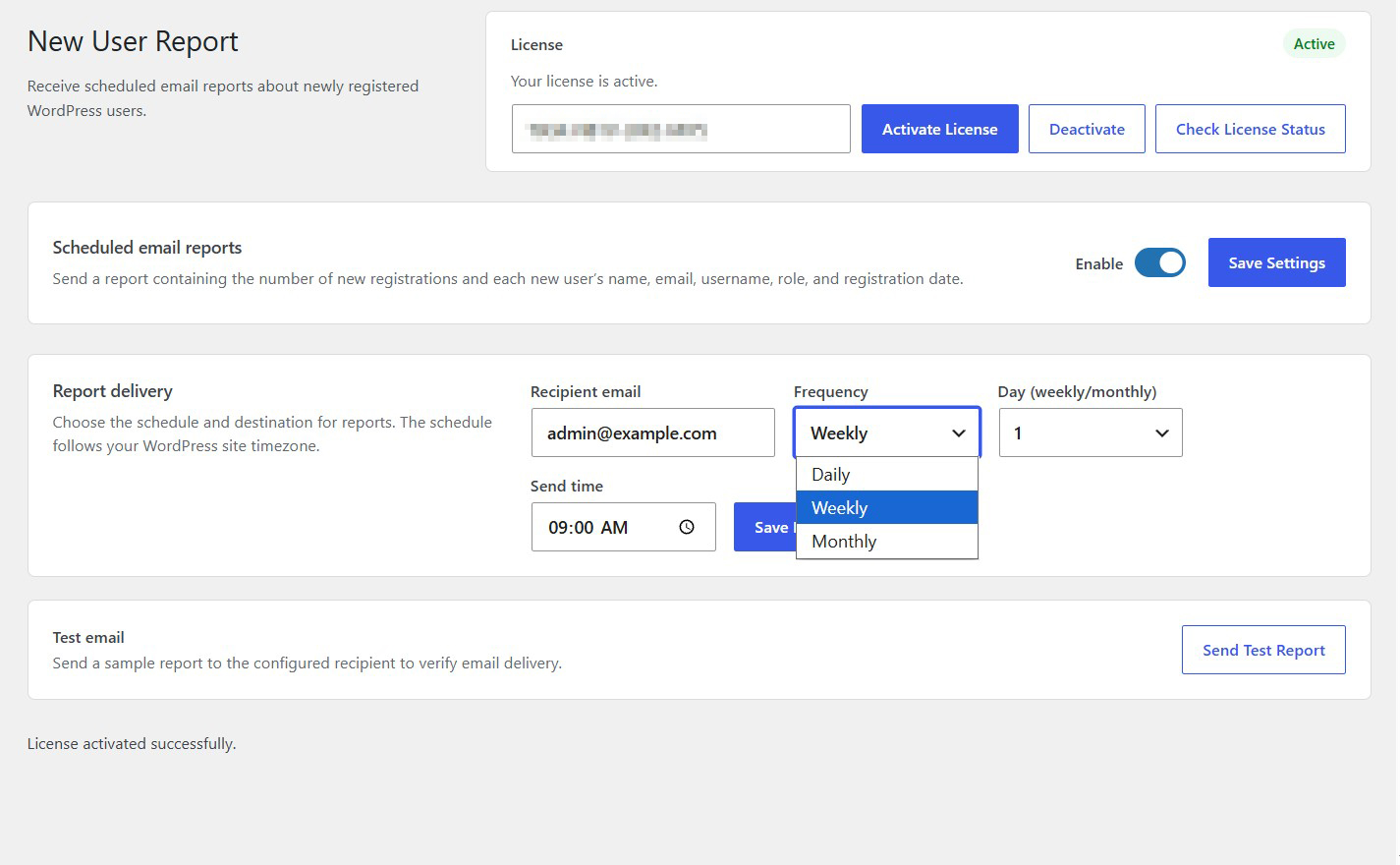
Daily, Weekly or Monthly Reports
Choose how frequently you want to receive registration reports according to your administrative needs.
Flexible Report Scheduling
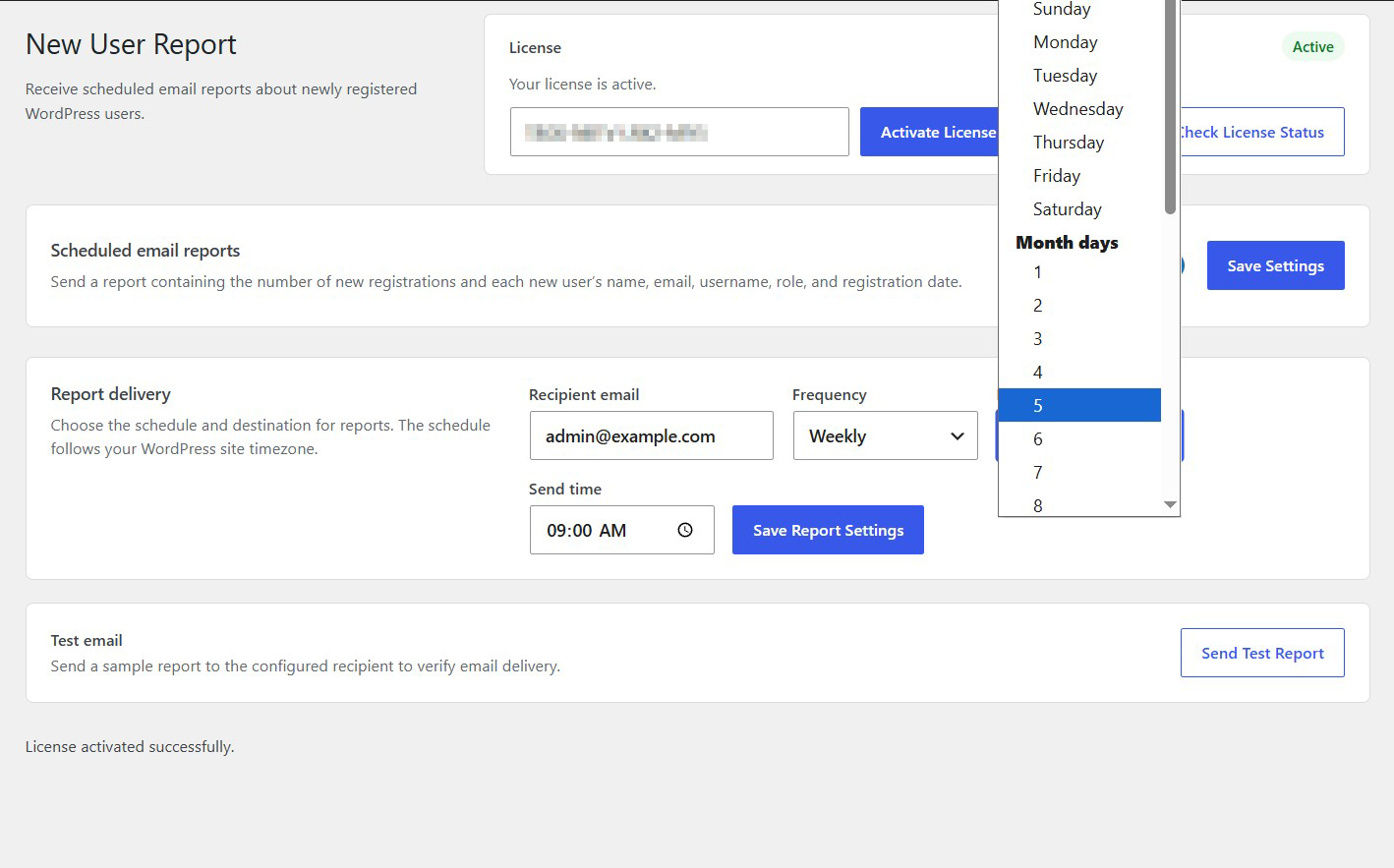
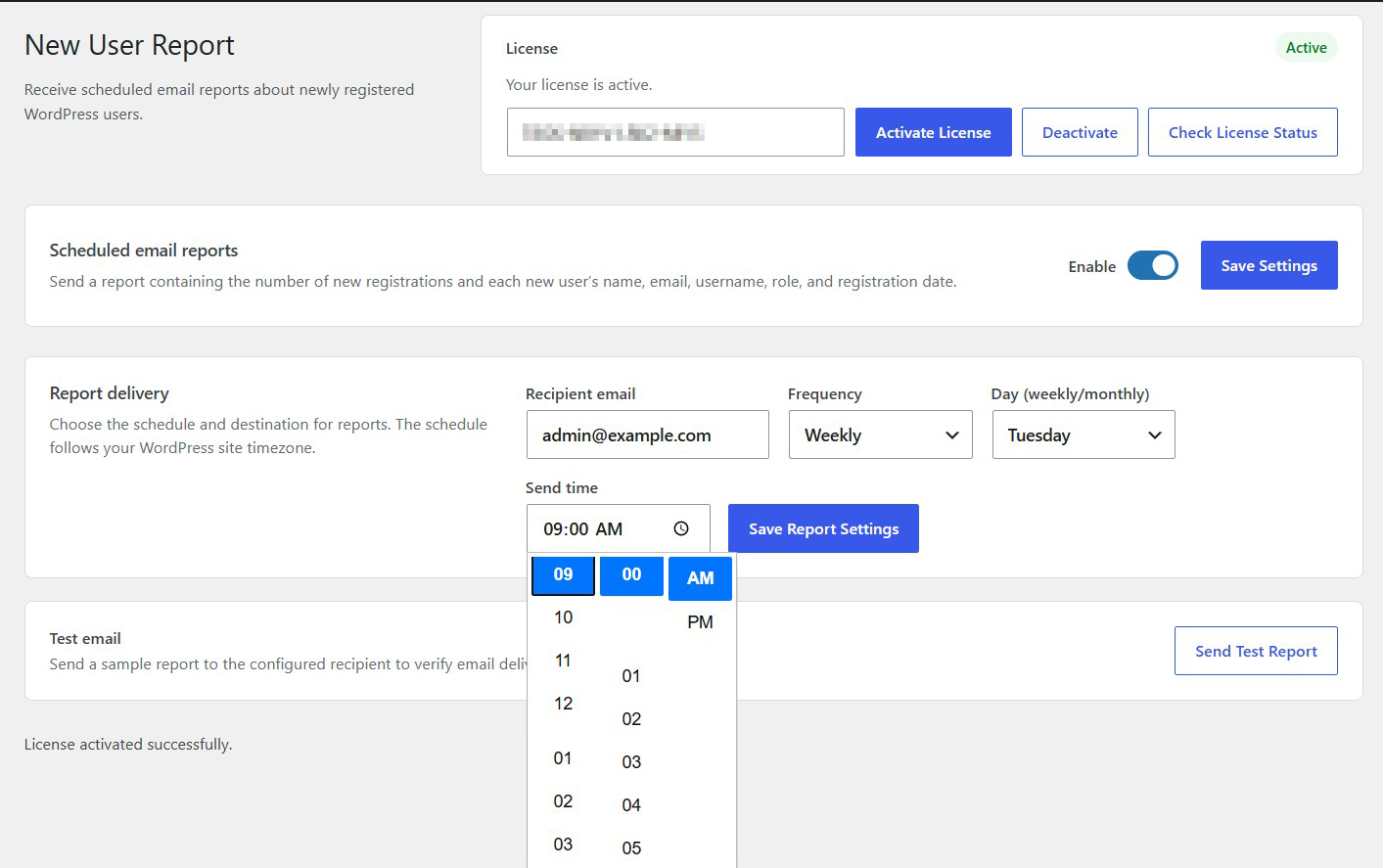
Select your preferred reporting day and delivery time, following your WordPress website’s configured timezone.
Complete User Registration Details
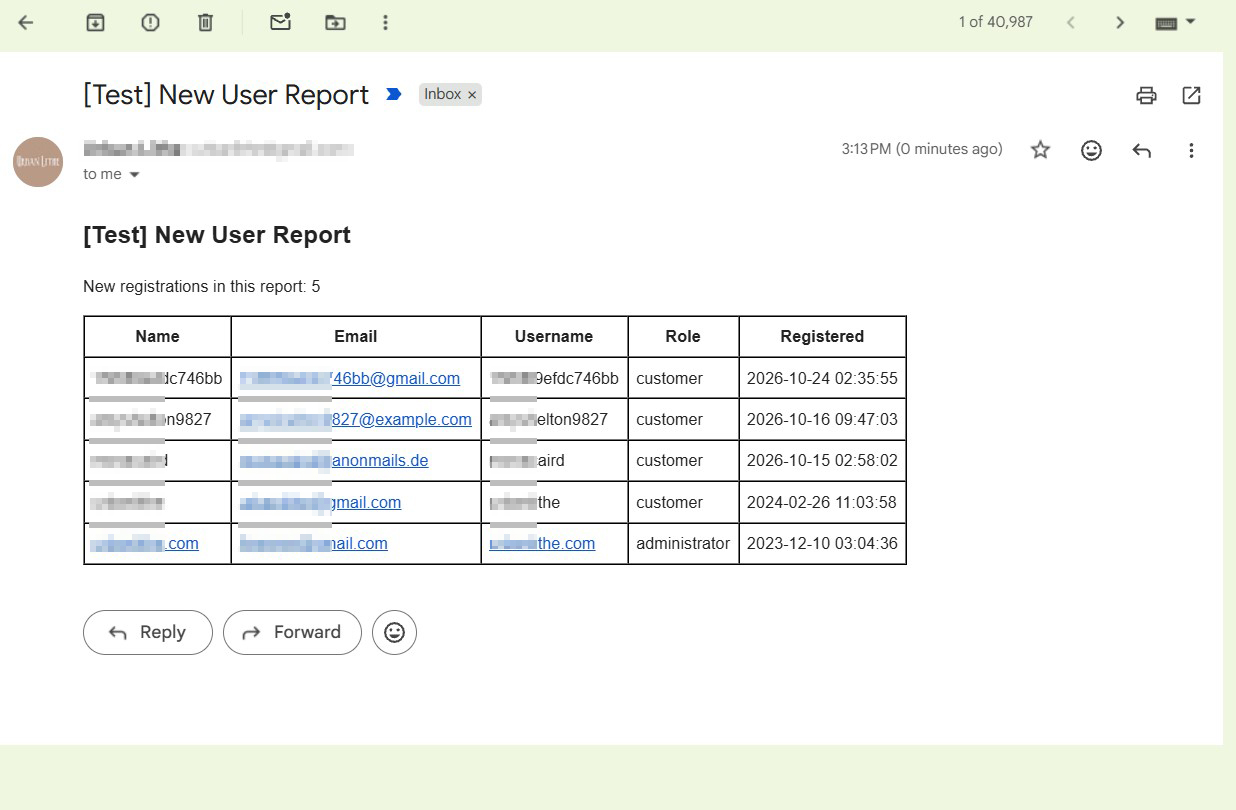
View each new user’s name, email address, username, role and registration date in an organized report.
Custom Report Recipient
Send registration reports to any email address you choose, independently of your WordPress administrator account.
Built-in Test Email
Send a sample report to your configured recipient to verify email delivery and report formatting.
Description
New User Report is a lightweight WordPress plugin that automatically sends scheduled email reports containing information about newly registered users on your website.
Keeping track of new registrations is important for website administrators, especially when managing membership platforms, online communities, customer accounts or websites with frequent user activity.
Instead of manually checking your WordPress Users screen, New User Report keeps you informed by delivering organized registration summaries directly to your inbox.
The plugin allows you to configure automated reports according to your preferred schedule, making it easy to monitor user registrations without constantly logging into your WordPress dashboard.
Flexible Reporting Schedule
Choose how frequently you want to receive reports:
Daily: Receive a registration report every day.
Weekly: Receive a report on your preferred day of the week.
Monthly: Receive a report on your selected day of the month.
You can also configure the exact delivery time. All scheduled reports follow your WordPress website’s configured timezone.
Complete User Registration Information
Each report includes the total number of new registrations during the reporting period, together with an organized table containing:
User name
Email address
Username
User role
Registration date
This makes it easy to review new accounts and understand user registration activity at a glance.
Custom Email Recipient
Choose the email address where reports should be delivered. You can send reports to your administrator account, a dedicated monitoring inbox or another authorized recipient.
Test Email Functionality
Before relying on scheduled reports, use the built-in Send Test Report feature to send a sample email to your configured recipient and verify that the report can be delivered.
Simple Configuration
The plugin provides straightforward settings for enabling automated reports, selecting delivery frequency, choosing the reporting day, configuring the recipient email address and setting the delivery time.
Once configured, reports are delivered automatically according to your selected schedule.
Whether you manage a membership website, an online store, a professional community or a business website with customer registrations, New User Report helps you stay informed about new users without manual monitoring.
Stay informed about every new registration with automated WordPress user reports.
Key Features
- Automatically generate new user registration reports
- Daily, weekly and monthly reporting options
- Select a preferred weekly or monthly reporting day
- Configure the scheduled email delivery time
- Choose a custom report recipient email address
- Include the total number of new registrations
- Display each new user's name
- Include user email addresses
- Include WordPress usernames
- Display assigned user roles
- Include user registration dates
- Organized HTML email reports
- Built-in test email functionality
- Enable or disable scheduled reporting
- Simple WordPress administration interface
- No external reporting services required
Frequently Asked Questions
How frequently can I receive reports?
You can choose between daily, weekly and monthly reporting schedules.
Can I choose which day of the week reports are delivered?
Yes. For weekly reports, you can select your preferred delivery day, from Sunday through Saturday.
Can I choose a specific day of the month?
Yes. Monthly reports allow you to select the preferred day of the month.
Can I choose the exact delivery time?
Yes. You can configure the time at which scheduled reports should be sent.
What information is included in each report?
Each report includes the total number of new registrations and the name, email address, username, role and registration date of each new user.
Can I send reports to an email address other than the administrator's?
Yes. You can specify any email address you choose as the report recipient.
Can I send reports to multiple recipients?
The plugin’s current settings provide one recipient email address field. Multiple recipient management is not currently offered through the interface.
Can I test the email report before enabling scheduled delivery?
Yes. Use the Send Test Report button to send a sample report to your configured recipient.
Does the test report contain actual user information?
Yes. The sample report uses registration information available on your website to demonstrate the report format and contents.
Does the plugin send a separate email for every new registration?
No. It generates consolidated reports according to your selected reporting schedule rather than sending an individual notification for every registration.
Does the plugin require an external reporting service?
No. It works directly within your WordPress installation.
Is it suitable for membership websites?
Yes. It is particularly useful for membership websites, online communities, customer portals and other platforms where monitoring new registrations is important.
Can I temporarily stop receiving reports?
Yes. You can disable scheduled reporting through the plugin settings and enable it again whenever needed.
Will the plugin send reports if no new users have registered?
The reporting interface is designed to report new registrations during the reporting period. Whether empty reports are delivered depends on the plugin’s reporting behavior.
Does the plugin replace the standard WordPress new-user notification?
No. It provides scheduled registration summaries and is separate from WordPress’s standard individual registration notifications.
Does it require an SMTP plugin?
No. However, a properly configured SMTP service or email delivery provider is recommended for reliable WordPress email delivery.
Related Plugins

Add User Registration Date Column to Users
See when each user registered directly in your WordPress Users screen.

Change WordPress Email Sender
Customize the sender name and email address used for outgoing WordPress emails.

Disable All Emails
Temporarily prevent WordPress from sending outgoing emails while the plugin is enabled.