

Disable WordPress Emoji
Remove unnecessary emoji functionality and keep your WordPress site lean.
WordPress includes built-in emoji support, but not every website needs it. Disable the extra emoji-related functionality with a focused plugin designed to simplify your site’s output and reduce unnecessary resources.
A straightforward solution for website owners who prefer a cleaner, more minimal WordPress setup.
Key highlights:
- Disable WordPress’s built-in emoji functionality.
- Reduce unnecessary emoji-related scripts and styles.
- Keep your website’s frontend output cleaner.
- Simplify your WordPress configuration.
- No external APIs or third-party services required.
Choose Your License
1 Year / 1 Site
Use on 1 website for 1 year.
$0.99
1 Year / 10 Sites
Use on up to 10 websites for 1 year.
$6.99
Lifetime / 1 Site
One time payment. Use on 1 website forever.
$4.99
Secure Checkout
Instant Download
24/7 Email Support
Plugin Details
| Version | 1.0.0 |
| Total File Size | 49.9 KB |
| Last Updated | Oct 28, 2026 |
| Requires WordPress | 6.0+ |
| Requires PHP | 7.4+ |
| Compatible With | WordPress, WooCommerce, Elementor & Contact Form 7 |
| Support | 24/7 Email Support |
Disable WordPress Emoji Support
Turn off the built-in WordPress emoji functionality across your website.
Remove Emoji Scripts
Prevent WordPress from loading its default emoji-related JavaScript.
Remove Emoji Styles
Disable WordPress emoji-specific stylesheets to reduce unnecessary front-end assets.
Disable Emoji Conversion
Turn off WordPress emoji conversion support that replaces certain text characters with emoji images.
Reduce Unnecessary Assets
Help simplify your website by removing emoji-related resources that your site may not need.
Simple One-Click Control
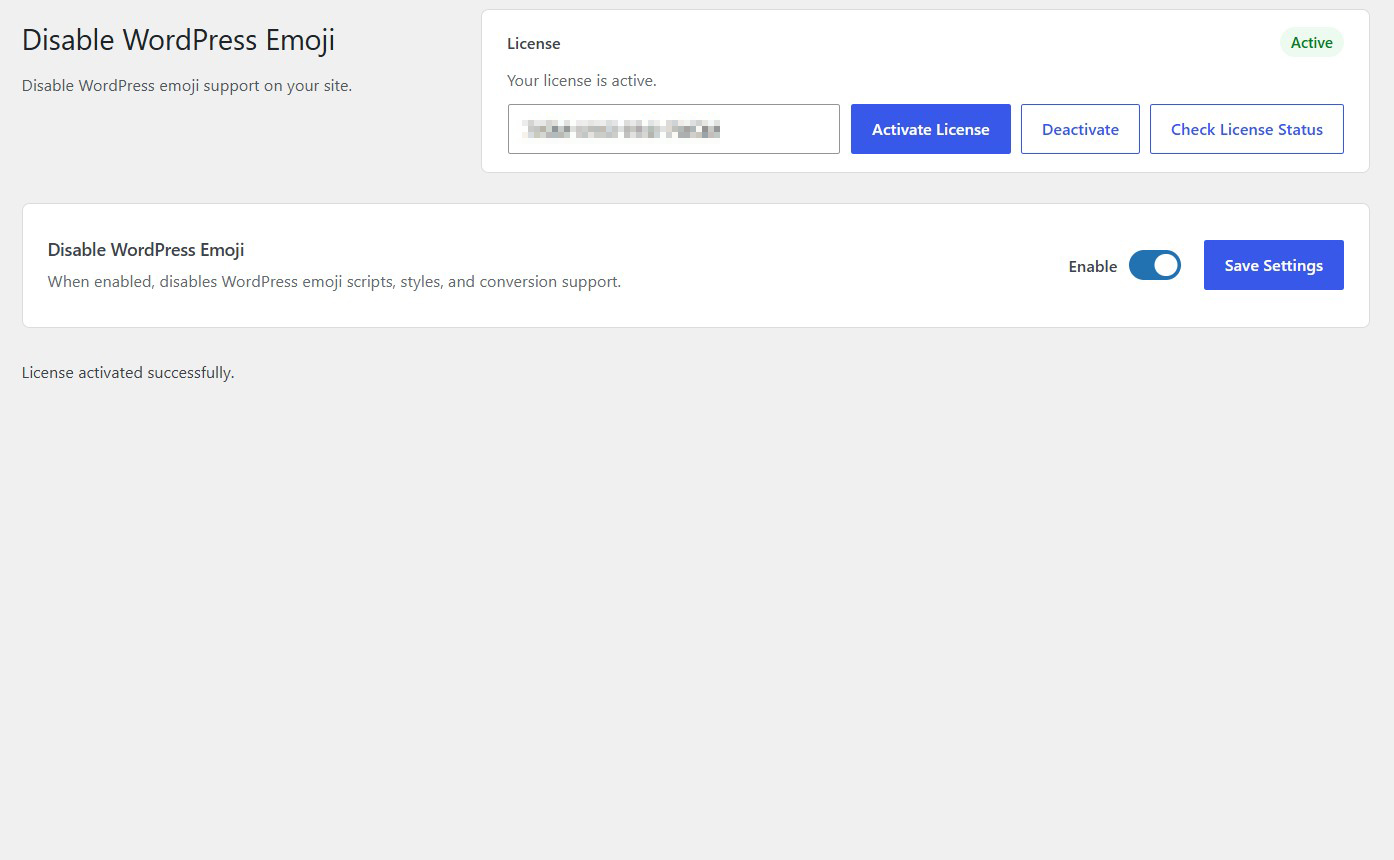
Enable or disable WordPress emoji functionality directly from one convenient settings screen.
Description
Disable WordPress Emoji is a lightweight plugin that allows you to turn off the built-in emoji functionality included in WordPress.
WordPress automatically loads emoji-related JavaScript, styles and conversion functionality to provide emoji support across websites. However, not every website needs these additional resources.
When enabled, this plugin disables WordPress emoji scripts, styles and conversion support, helping reduce unnecessary assets loaded by your website.
By removing functionality you may not use, you can simplify your WordPress installation and potentially reduce unnecessary front-end requests.
The plugin works automatically without requiring manual code modifications, theme editing or server configuration.
Simply enable the functionality and save your settings to disable WordPress emoji support.
Whether you operate a business website, blog, membership platform or online store, Disable WordPress Emoji provides a simple way to remove built-in emoji functionality you don’t need.
Lightweight and easy to use, it works directly within WordPress without requiring external services, additional configurations or technical knowledge.
Key Features
- Disable built-in WordPress emoji support
- Remove default WordPress emoji JavaScript
- Disable WordPress emoji-related stylesheets
- Disable automatic emoji conversion functionality
- Reduce unnecessary front-end assets
- Help simplify your WordPress installation
- No manual code modifications required
- No theme editing required
- No server configuration required
- Simple centralized settings screen
- Enable or disable functionality whenever needed
- Lightweight and easy to use
- No external services or API keys required
Frequently Asked Questions
What does Disable WordPress Emoji do?
The plugin disables the built-in WordPress emoji functionality, including its related JavaScript, stylesheets and emoji conversion support.
Why would I want to disable WordPress emojis?
If your website does not rely on WordPress emoji functionality, disabling it can help eliminate unnecessary scripts and styles that WordPress would otherwise load.
Does disabling WordPress emojis improve website performance?
It can help reduce unnecessary front-end resources and HTTP requests. However, the actual performance improvement depends on your website, theme, plugins and caching configuration.
Will emojis disappear completely from my website?
No. Disabling WordPress emoji support does not necessarily prevent emojis from appearing. Modern browsers and operating systems can display standard Unicode emoji characters natively without WordPress emoji scripts.
Does the plugin remove emoji images from my existing posts?
No. The plugin does not delete existing post content or remove emoji characters from your database. It disables WordPress’s built-in emoji functionality.
Will this affect my existing WordPress posts and pages?
No existing content is modified. However, WordPress-specific emoji conversion functionality will no longer be available while the plugin is enabled.
Will this affect WooCommerce?
The plugin does not intentionally modify WooCommerce functionality. However, if your theme or another plugin relies on WordPress emoji scripts or conversion functionality, you should test your store after enabling it.
Does this plugin disable emojis on mobile devices?
No. Mobile operating systems and browsers have their own native emoji support. The plugin disables WordPress-specific emoji functionality rather than native device emoji rendering.
Do I need to modify WordPress files or theme code?
No. Everything is managed through the plugin’s settings screen.
Can I re-enable WordPress emoji support later?
Yes. Simply disable the plugin functionality and save your settings to restore the normal WordPress emoji behavior.
Does this plugin require external services?
No. The plugin works entirely within your WordPress installation without external services, API keys or third-party connections.
Does disabling emoji support affect website security?
The plugin is primarily a performance and website cleanup tool, not a security solution. Its purpose is to disable unnecessary WordPress emoji functionality.
Related Plugins

Disable WordPress RSS
Disable WordPress RSS feeds to prevent your website from generating RSS and Atom feeds when you don’t need them.

Remove WordPress Generator
Remove the WordPress version generator tag from your website’s HTML source code to keep unnecessary version information out of public page output.

Disable Trackbacks & Pingbacks
Prevent WordPress trackbacks and pingbacks from being sent or accepted, helping reduce unwanted communication and unnecessary functionality.