

Add User Registration Date Column to Users
See when each user registered directly in your WordPress Users list.
Need to know when users joined your WordPress website? Add a registration date column to your Users table and view account creation dates without opening individual user profiles.
A simple, practical tool for website administrators who want better visibility into user registrations and easier account management.
Key highlights:
- Display user registration dates in the Users list.
- Check when individual accounts were created.
- Make user management more convenient.
- Review account registration information at a glance.
- No external APIs or third-party services required.
Choose Your License
1 Year / 1 Site
Use on 1 website for 1 year.
$0.99
1 Year / 10 Sites
Use on up to 10 websites for 1 year.
$6.99
Lifetime / 1 Site
One time payment. Use on 1 website forever.
$6.99
Secure Checkout
Instant Download
24/7 Email Support
Plugin Details
| Version | 1.0.0 |
| Total File Size | 53.2 KB |
| Last Updated | Oct 28, 2026 |
| Requires WordPress | 6.0+ |
| Requires PHP | 7.4+ |
| Compatible With | WordPress, WooCommerce, Elementor & Contact Form 7 |
| Support | 24/7 Email Support |
View User Registration Dates
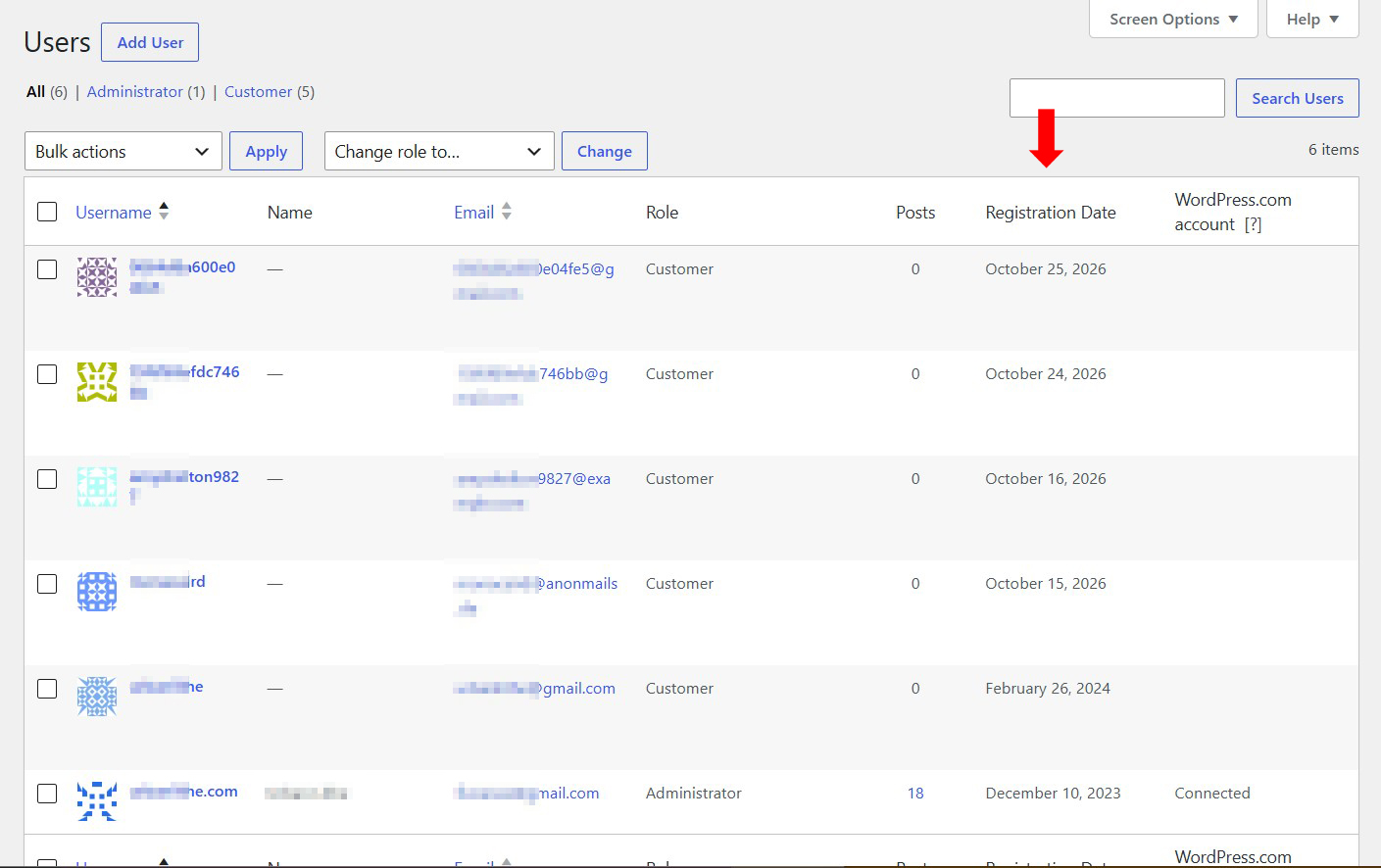
See when each user registered directly from your WordPress Users administration screen.
Dedicated Registration Date Column
Adds a clearly labeled Registration Date column alongside existing user information.
WordPress Date Format Integration
Automatically formats registration dates according to your website’s WordPress date settings.
Quick User Registration Overview
Identify recently registered users without opening individual user profiles.
Works with All User Roles
View registration dates for administrators, editors, authors, customers and other registered user roles.
One-Click Enable or Disable
Show or hide the Registration Date column whenever you need it.
Description
Add User Registration Date Column to Users is a lightweight WordPress plugin that makes it easier to track when users register on your website.
By default, WordPress does not display user registration dates in its standard Users administration screen. This means administrators often need to open individual user profiles or use additional tools to find out when an account was created.
This plugin solves that problem by adding a dedicated Registration Date column directly to your WordPress Users list.
Once enabled, you can immediately see the registration date of each user alongside their existing account information.
The displayed dates automatically follow your website’s WordPress date settings, ensuring a consistent format throughout your administration area.
Whether you manage a membership website, an online store, a community platform or a website with multiple registered users, having registration dates readily available makes user management more convenient.
You can quickly identify recently registered accounts, review older registrations and get a better overview of your website’s user activity without opening individual profiles.
There is no complicated configuration or additional setup required.
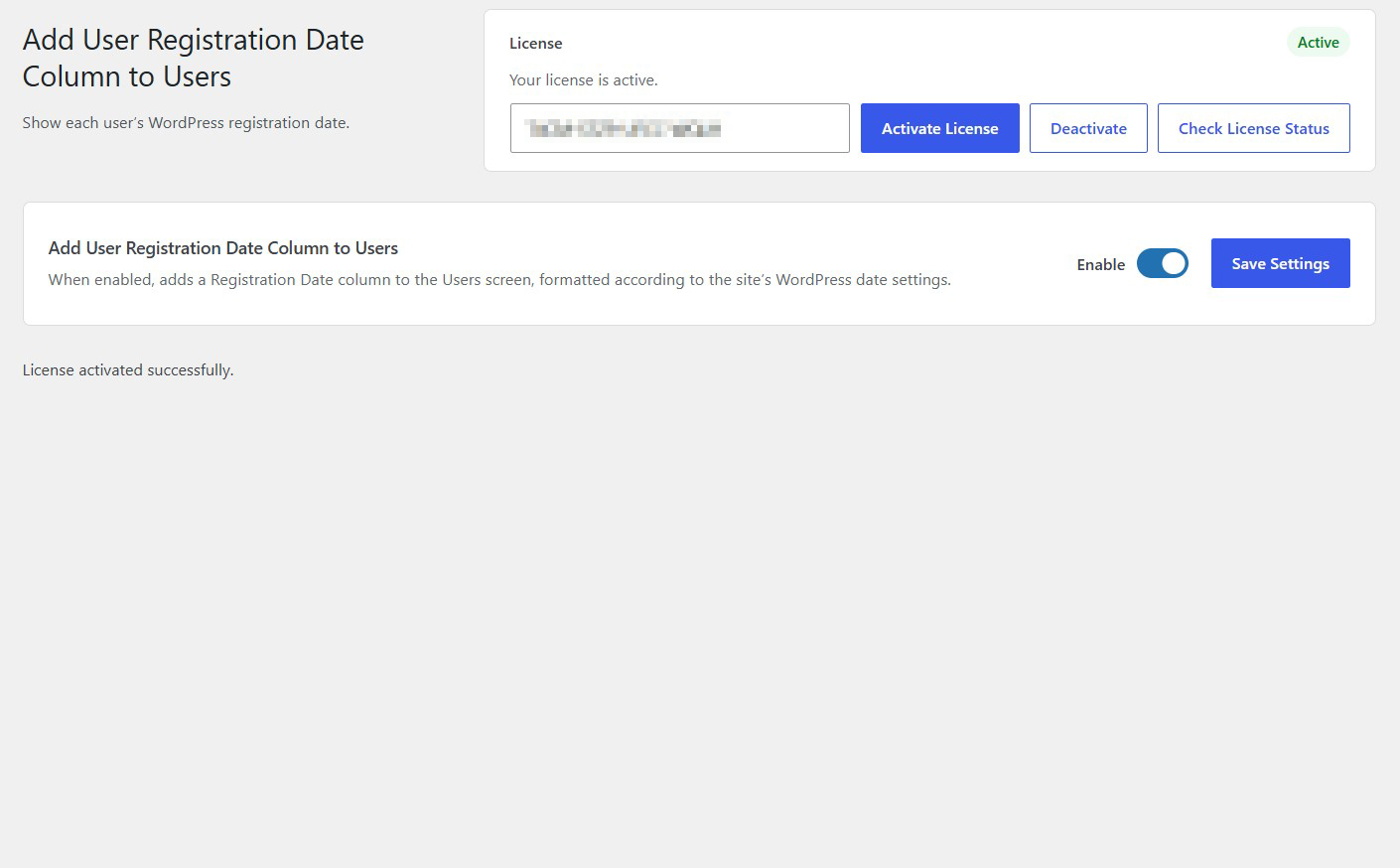
Simply enable the plugin, save your settings and visit the WordPress Users screen.
A simple way to make user registration information more accessible, directly where you manage your WordPress users.
Key Features
- Add a Registration Date column to the WordPress Users screen
- Display the registration date for each user
- Automatically follow WordPress date format settings
- View registration dates alongside usernames and email addresses
- Works with different WordPress user roles
- No need to open individual user profiles
- Simple centralized settings screen
- Enable or disable the registration date column whenever needed
- Lightweight and easy to use
- No external services or API keys required
Frequently Asked Questions
What does Add User Registration Date Column to Users do?
It adds a Registration Date column to your WordPress Users administration screen, allowing you to see when each user account was created.
Where can I find the registration dates?
You can find them directly on your WordPress dashboard under Users → All Users.
Does it work with all user roles?
Yes. The column is designed to display registration dates for users regardless of their assigned WordPress role.
Can I identify recently registered users?
Yes. The registration dates make it easier to identify when individual accounts were created and review recent registrations.
Do I need to open individual user profiles?
No. Registration dates appear directly in the Users list, saving you time when reviewing multiple accounts.
Does the plugin change existing user information?
No. It displays the existing registration date without changing user accounts or their profile information.
Can I disable the Registration Date column?
Yes. You can disable the plugin functionality through its settings screen whenever you no longer need the additional column.
Does it require external services?
No. It works directly within your WordPress installation without external services, API keys or third-party connections.
Is it useful for membership websites and online stores?
Absolutely. It is particularly useful for membership websites, WooCommerce stores, online communities and other websites where tracking user registration dates is important.
Related Plugins

Change Post Author
Easily change the author assigned to individual posts or multiple posts using WordPress bulk actions.

Show Plugin File Path & Size
Display plugin installation paths and file sizes directly in your WordPress Plugins list.

Post Status Changer
Change the status of multiple WordPress posts at once using bulk actions.