

Clean Unused Media
Find unused media files and keep your WordPress media library organized.
Over time, your WordPress media library can accumulate images and other files that are no longer needed. Clean Unused Media helps you identify potentially unused media so you can review unnecessary files and keep your library easier to manage.
Key highlights:
- Identify potentially unused media files
- Keep your WordPress media library organized
- Reduce clutter from old and unnecessary uploads
- Review files before removing them
- Simplify ongoing media library maintenance
Choose Your License
1 Year / 1 Site
Use on 1 website for 1 year.
$2.99
1 Year / 10 Sites
Use on up to 10 websites for 1 year.
$9.99
Lifetime / 1 Site
One time payment. Use on 1 website forever.
$12.99
Secure Checkout
Instant Download
24/7 Email Support
Plugin Details
| Version | 1.0.0 |
| Total File Size | 56.3 KB |
| Last Updated | Oct 28, 2026 |
| Requires WordPress | 6.0+ |
| Requires PHP | 7.4+ |
| Compatible With | WordPress, WooCommerce, Elementor & Contact Form 7 |
| Support | 24/7 Email Support |
Find Unused Media Files
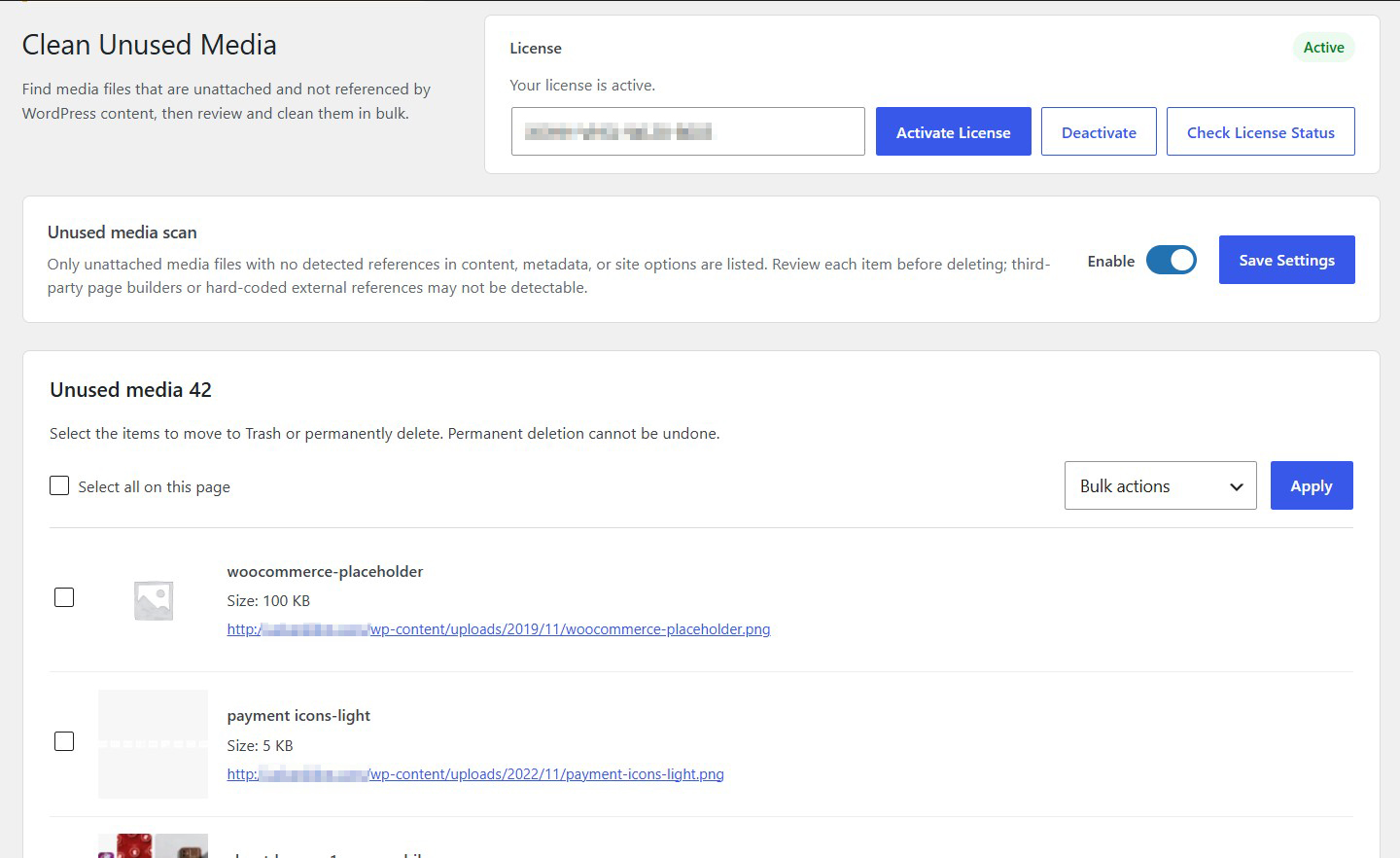
Scan your WordPress media library to identify unattached files with no detected references in your website’s content, metadata or site options.
Review Before Deleting
Browse identified unused media files, including their filenames, file sizes and direct URLs, before deciding what to remove.
Bulk Media Selection
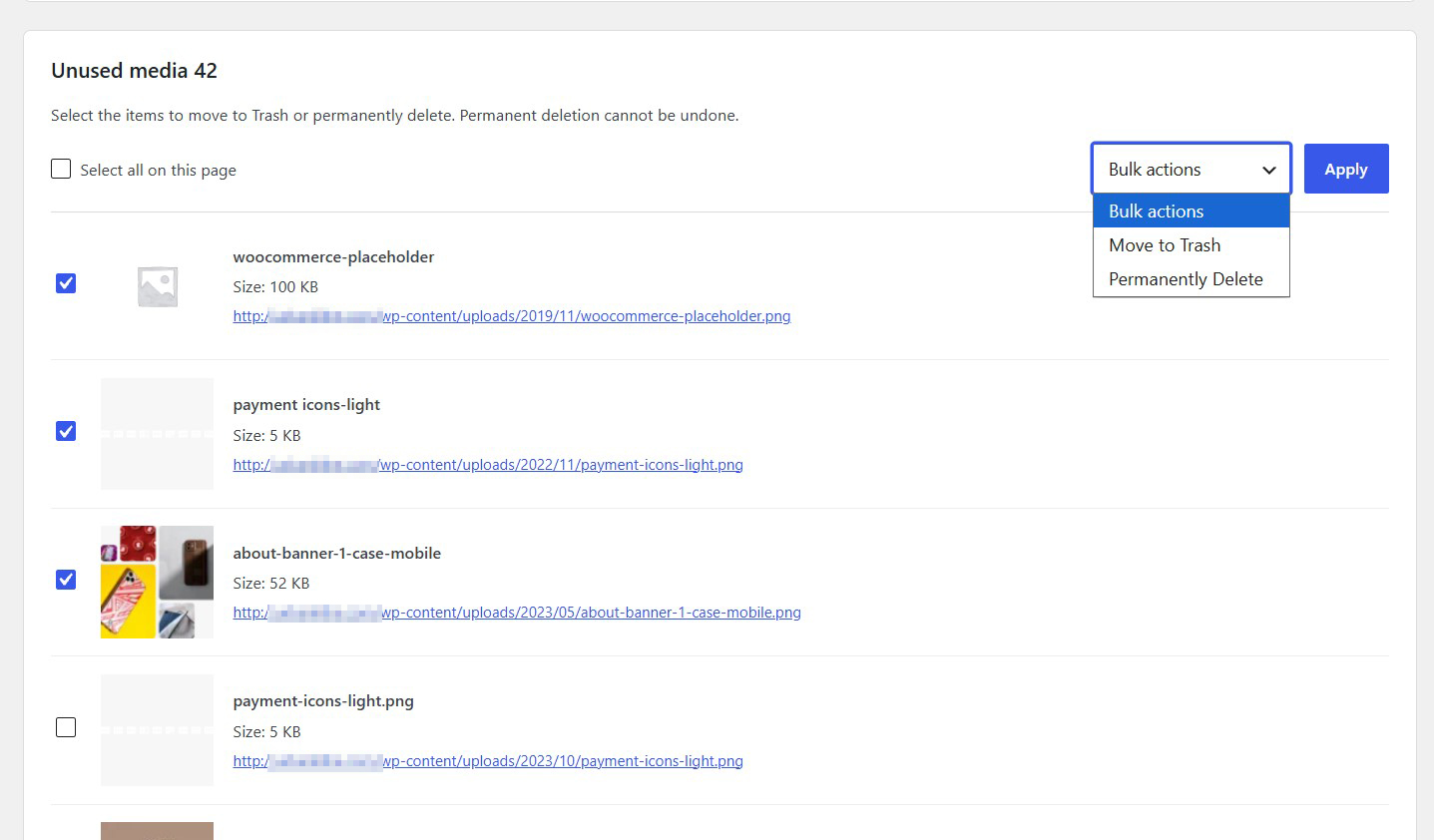
Select individual files or use the Select All option to quickly choose multiple media files for cleanup.
Two Cleanup Options
Move selected files to Trash for a safer removal process or permanently delete them when you are certain they are no longer needed.
Understand What Is Being Removed
View each file’s name, size and URL to help identify media files before taking action.
License-Controlled Media Scanning
Access the unused media scanning functionality while your WP Actions license is active.
Description
Clean Unused Media is a lightweight WordPress plugin designed to help you identify and remove unnecessary media files from your website.
Over time, WordPress websites accumulate images, documents and other media files that are no longer attached to posts, pages or other website content. These files can occupy valuable server storage space and make media library management more difficult.
Clean Unused Media helps you identify potentially unused media files through an automated scanning process, allowing you to review and remove unnecessary files in bulk.
Find Potentially Unused Media Files
The plugin scans your WordPress media library and identifies unattached media files that have no detected references in WordPress content, metadata or site options.
Instead of manually browsing hundreds or thousands of media library entries, you can use the plugin to generate a dedicated list of files that may be suitable for removal.
Review Files Before Cleanup
The plugin displays identified media files in an organized list, including:
Media filename
File size
Direct media file URL
Individual selection checkbox
This information helps you recognize the files and evaluate whether they are still needed before removing them.
Bulk Media Selection
Clean Unused Media makes it easy to select files for cleanup.
You can select individual media files or use the Select All option to select all displayed items on the current page.
This makes it particularly convenient when managing websites with large media libraries.
Two Flexible Cleanup Options
Once you have selected the files you want to remove, you can choose between two cleanup actions:
Move to Trash: Move selected media files to the WordPress Trash, providing an opportunity to review or restore them before permanent removal, where supported.
Permanently Delete: Permanently remove selected media files. This action cannot be undone.
Having both options gives you flexibility depending on how confident you are that the selected files are no longer needed.
Review Before Deleting
Clean Unused Media is designed to help you make informed cleanup decisions rather than automatically deleting files.
It is important to understand that an unattached media file is not necessarily an unused file. Images referenced by third-party page builders, hard-coded URLs or external systems may not be detected by the scanning process.
For this reason, always review the identified files before deleting them.
License-Controlled Functionality
The unused media scanning functionality is available while your WP Actions license is active.
With Clean Unused Media, you can keep your WordPress media library better organized, identify potentially unnecessary files and simplify routine website maintenance.
Find it. Review it. Clean it.
Key Features
- Scan the WordPress media library for potentially unused files
- Identify unattached media files
- Display identified unused media files
- Display media filenames
- Display individual file sizes
- Display direct media file URLs
- Individual file selection
- Select All option for the current page
- Bulk media cleanup actions
- Move selected files to WordPress Trash
- Permanently delete selected files
- Review files before deletion
- Simple WordPress administration interface
Frequently Asked Questions
How does the plugin identify potentially unused media?
The plugin checks for media references in WordPress content, metadata and site options. It lists unattached files for which no references are detected.
What information is displayed for each file?
The results include the media filename, file size and direct URL.
Can I select individual files?
Yes. Each listed media file has its own checkbox, allowing you to select specific files for cleanup.
Can I select all displayed files at once?
Yes. Use the Select All option to select all listed items on the current page.
What bulk actions are available?
You can choose between Move to Trash and Permanently Delete.
What happens when I move files to Trash?
Selected files are moved to the WordPress Trash, where they can potentially be restored before permanent deletion.
Can I permanently delete selected files?
Yes. Select Permanently Delete from the bulk actions menu. Be aware that permanent deletion cannot be undone.
Can the plugin detect hard-coded image URLs?
Not necessarily. Hard-coded external references may not be detected, so an unattached file could still be used somewhere on your website.
Does an unattached media file always mean it is safe to delete?
No. Unattached files can still be referenced by custom code, page builders, external applications or other systems. Always inspect the files before removing them.
Can I restore permanently deleted files?
No. Permanent deletion cannot be undone through the plugin. Always consider moving files to Trash first if you are uncertain.
Related Plugins

Show Plugin File Path & Size
Display plugin file paths and sizes directly in your WordPress Plugins list.

Custom CSS/PHP/JS Snippets
Create and manage custom CSS, PHP and JavaScript snippets directly from WordPress.

Disable Admin Notices
Hide standard WordPress administration notices throughout your dashboard.