

Duplicate Post
Copy any WordPress post and start creating new content in seconds.
Stop recreating similar blog posts from scratch. Duplicate an existing post and use it as the starting point for your next article, announcement, or content update. Keep your original post intact while saving time on repetitive content creation.
A simple, practical tool for WordPress bloggers, publishers, and website managers.
Key highlights:
- Duplicate existing WordPress posts quickly.
- Keep the original post unchanged.
- Reuse existing content as a starting point for new articles.
- Save time when creating posts with similar structures.
- Simple functionality without complicated settings.

Choose Your License
1 Year / 1 Site
Use on 1 website for 1 year.
$0.99
1 Year / 10 Sites
Use on up to 10 websites for 1 year.
$6.99
Lifetime / 1 Site
One time payment. Use on 1 website forever.
$4.99
Secure Checkout
Instant Download
24/7 Email Support
Plugin Details
| Version | 1.0.0 |
| Total File Size | 52.1 KB |
| Last Updated | Oct 28, 2026 |
| Requires WordPress | 6.0+ |
| Requires PHP | 7.4+ |
| Compatible With | WordPress, WooCommerce, Elementor & Contact Form 7 |
| Support | 24/7 Email Support |
Duplicate Posts with One Click
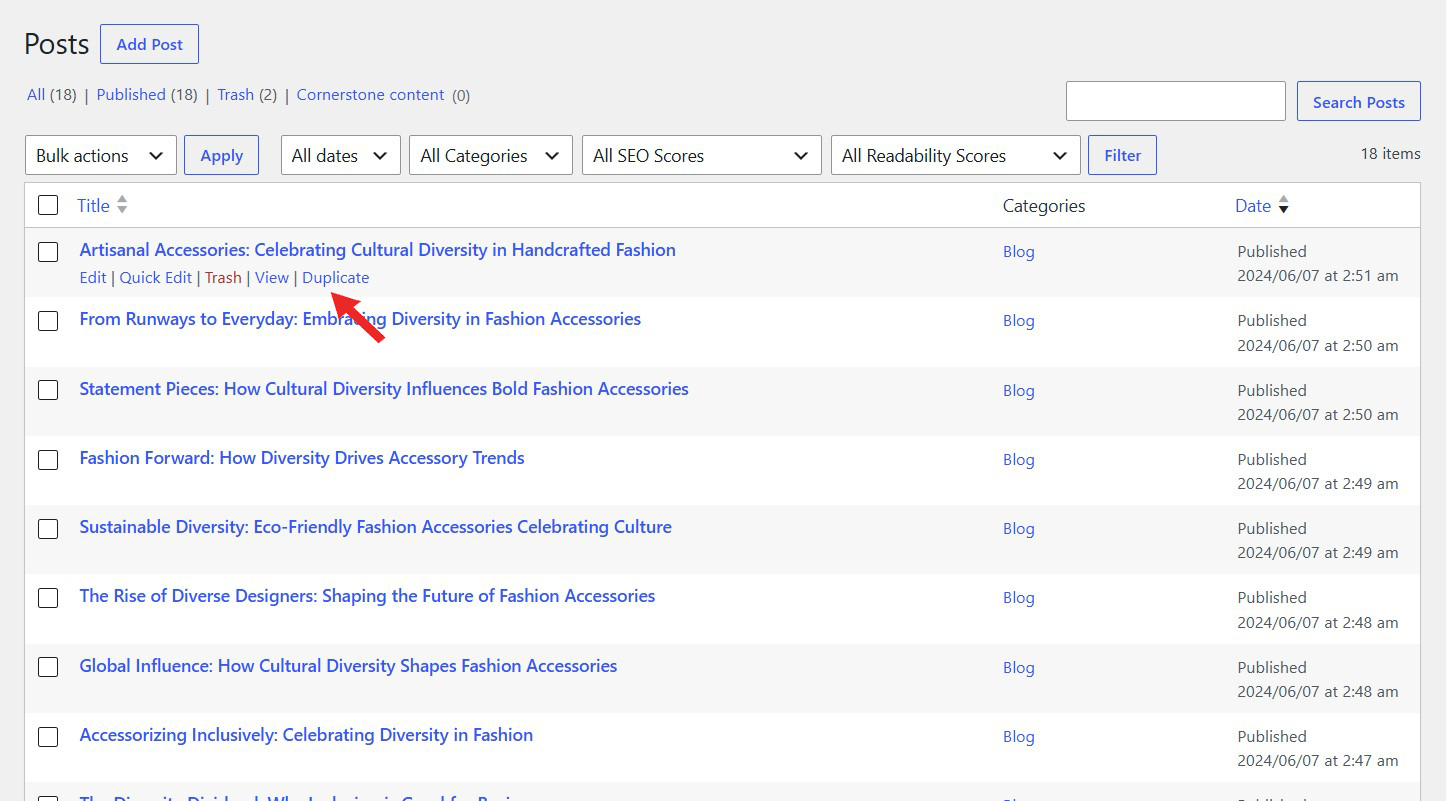
Create a copy of any existing WordPress post directly from your Posts list.
Copy Post Content
Duplicate the original post content without manually copying and pasting anything.
Preserve Post Status
Retain the original post’s publication status, whether it is published, draft or another supported status.
Keep Featured Images
Automatically copy the original post’s featured image to the duplicated post.
Copy Custom Fields & Taxonomies
Preserve custom field values, categories, tags and other associated taxonomy terms.
Simple Post Management
Access the Duplicate action directly beneath each post title in your WordPress Posts list.
Description
Duplicate Post makes it easy to create copies of existing WordPress posts with a single click.
Instead of manually recreating a post or copying its content into a new one, you can duplicate an existing post directly from your WordPress Posts list.
Once enabled, the plugin adds a convenient Duplicate action beneath each post title. Simply click it to create a new copy of the selected post.
The duplicated post preserves the original post’s content, publication status, featured image, custom fields and taxonomy terms, making it easy to create new posts based on existing content.
Whether you publish regular blog articles, manage multiple content categories or frequently create similar posts, Duplicate Post helps save time and simplifies your publishing workflow.
Lightweight and easy to use, the plugin integrates directly into your standard WordPress Posts screen without requiring complicated configurations or external services.
Key Features
- Duplicate WordPress posts with a single click
- Add a Duplicate action beneath each post title
- Copy the original post content
- Preserve the original publication status
- Copy featured images automatically
- Preserve custom field values
- Copy categories, tags and taxonomy terms
- Create duplicates directly from the WordPress Posts list
- No manual copying and pasting required
- Simple enable and disable functionality
- Lightweight with no external services or API keys required
Frequently Asked Questions
How do I duplicate a WordPress post?
Once the plugin is enabled, navigate to Posts in your WordPress dashboard. Hover over the post you want to duplicate and click the Duplicate action that appears beneath its title. A new copy of the post will be created automatically.
What information is copied when I duplicate a post?
The plugin copies the original post’s content, publication status, featured image, custom fields and taxonomy terms.
Does the duplicated post retain the original publication status?
Yes. The duplicated post preserves the original post’s status, whether it is published, draft or another supported status.
Are featured images copied as well?
Yes. The original post’s featured image is copied to the duplicated post.
Does the plugin copy custom fields?
Yes. The plugin copies the original post’s custom field values, allowing you to preserve additional information stored by WordPress or compatible plugins.
Are categories and tags preserved?
Yes. The duplicated post retains the taxonomy terms associated with the original post, including categories and tags.
Will duplicating a post affect the original post?
No. The plugin creates a separate copy and leaves the original post unchanged.
Where can I find the Duplicate option?
The Duplicate action appears beneath each post title in the standard WordPress Posts list when the plugin is enabled.
Can I duplicate the same post multiple times?
Yes. You can use the Duplicate action repeatedly to create multiple copies of the same original post.
Does this plugin also duplicate WordPress pages?
No. Duplicate Post is designed specifically for WordPress posts. If you also want to duplicate website pages, you can use our dedicated Duplicate Page plugin.
Do I need to configure any settings before duplicating posts?
No complicated configuration is required. Simply enable the plugin and the Duplicate action will become available in your WordPress Posts list.
Related Plugins

Duplicate Page
Create copies of existing WordPress pages with one click, preserving their content and associated information.

Post Status Changer
Change the publication status of WordPress posts quickly and conveniently.

Change Post Author
Easily change the assigned author of existing WordPress posts from your administration dashboard.