

Remove "Howdy"
Replace the default WordPress dashboard greeting with a cleaner, more professional welcome.
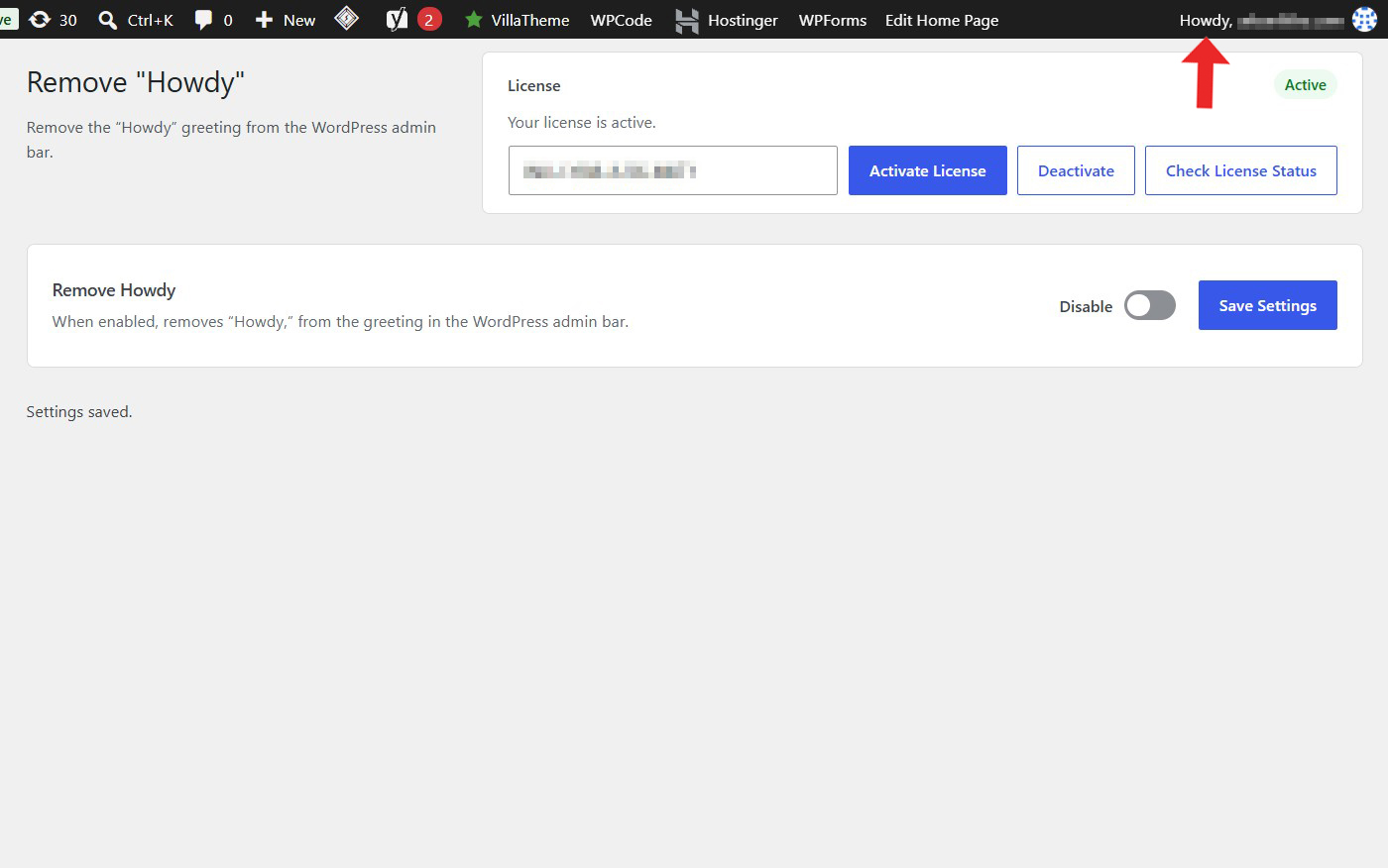
Not a fan of seeing “Howdy” every time you open your WordPress dashboard? Replace this familiar default greeting with a more neutral welcome message.
A tiny, focused plugin for website owners who want a cleaner WordPress admin experience without unnecessary settings or complexity.
Key highlights:
- Replace the default “Howdy” greeting.
- Customize the WordPress admin welcome message.
- Give your dashboard a more professional feel.
- Keep the WordPress admin experience simple.
- No external APIs or third-party services required.
Choose Your License
1 Year / 1 Site
Use on 1 website for 1 year.
$0.99
1 Year / 10 Sites
Use on up to 10 websites for 1 year.
$5.99
Lifetime / 1 Site
One time payment. Use on 1 website forever.
$3.99
Secure Checkout
Instant Download
24/7 Email Support
Plugin Details
| Version | 1.0.0 |
| Total File Size | 48.9 KB |
| Last Updated | Oct 28, 2026 |
| Requires WordPress | 6.0+ |
| Requires PHP | 7.4+ |
| Compatible With | WordPress, WooCommerce, Elementor & Contact Form 7 |
| Support | 24/7 Email Support |
Remove the "Howdy" Greeting
Remove the default “Howdy” text from the WordPress admin bar.
Clean Up the Admin Bar
Replace the standard WordPress greeting with a cleaner and less cluttered interface.
Professional Dashboard Experience
Give your WordPress administration area a more neutral and professional appearance.
Improve Admin Customization
Customize the WordPress admin bar without modifying core WordPress files.
Automatic Application
Apply the greeting removal automatically whenever the WordPress admin bar is displayed.
Simple One-Click Control
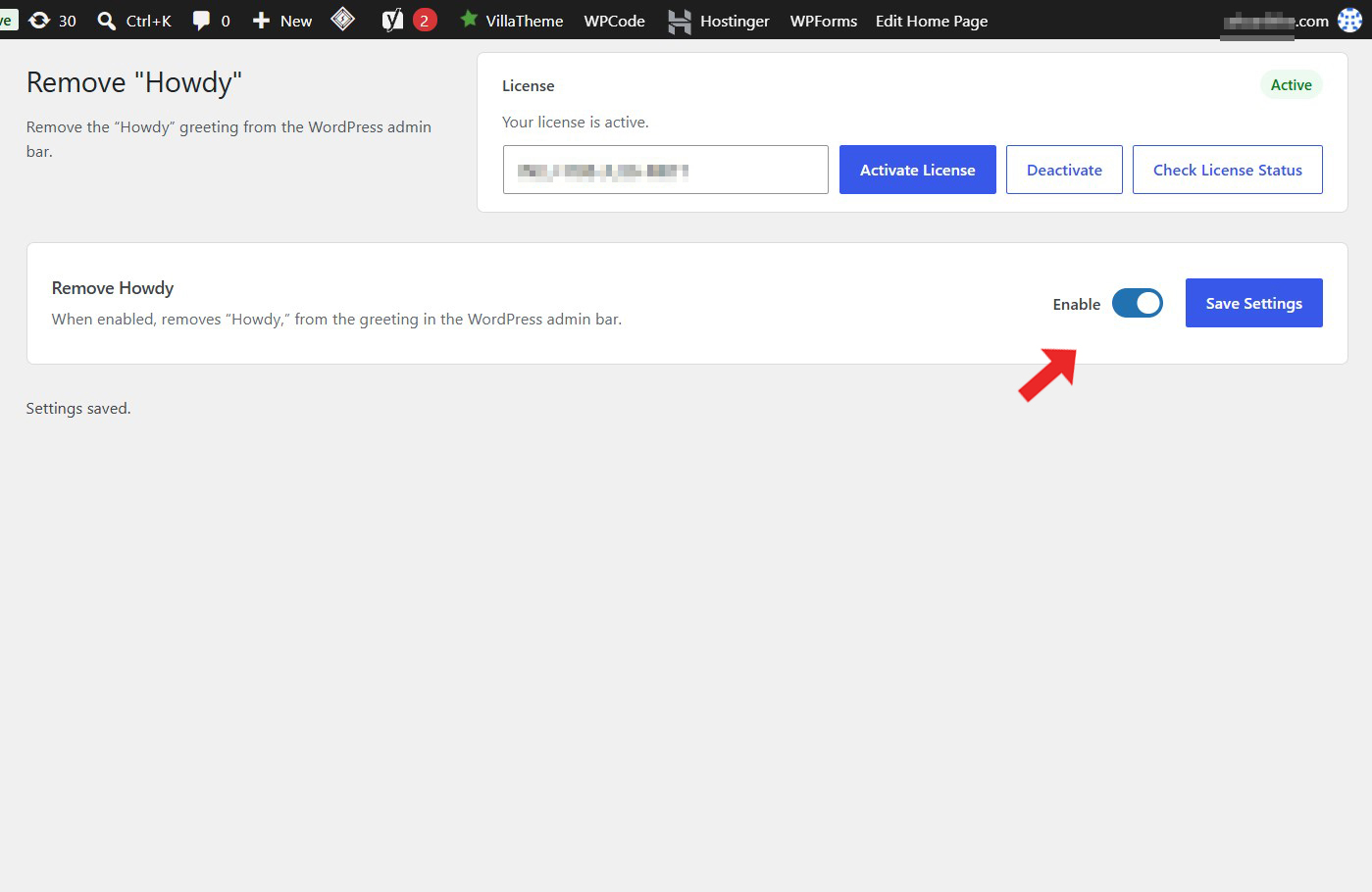
Enable or disable the “Howdy” removal directly from one convenient settings screen.
Description
Remove “Howdy” is a lightweight WordPress plugin that allows you to remove the default “Howdy” greeting displayed in the WordPress admin bar.
By default, WordPress displays a greeting such as “Howdy, [Username]” in the admin bar when users are logged in. While this is part of the standard WordPress interface, some website owners prefer a cleaner and more professional administration experience.
When enabled, this plugin removes the “Howdy” text from the greeting in the WordPress admin bar while keeping the rest of the user greeting and account functionality intact.
The result is a simpler, more neutral admin bar without the familiar default WordPress greeting.
The plugin works automatically without requiring manual code modifications, theme editing or server configuration.
Simply enable the functionality and save your settings to remove “Howdy” from the WordPress admin bar.
Whether you manage a personal website, business website, membership platform or online store, Remove “Howdy” provides a simple way to customize the WordPress administration interface.
Lightweight and easy to use, it works directly within WordPress without requiring external services, API keys or additional configurations.
Key Features
- Remove the default "Howdy" greeting from the WordPress admin bar
- Keep the username greeting intact
- Customize the standard WordPress admin interface
- Create a cleaner administration experience
- Give your dashboard a more professional appearance
- No manual code modifications required
- No theme editing required
- No server configuration required
- Simple centralized settings screen
- Enable or disable functionality whenever needed
- Lightweight and easy to use
- No external services or API keys required
Frequently Asked Questions
Does the plugin remove the entire user greeting?
No. It removes the “Howdy” text while keeping the rest of the greeting and user account functionality intact.
Does the plugin remove my username from the admin bar?
No. The username remains visible as part of the greeting.
Will this affect the WordPress administration dashboard?
No. The plugin only changes the greeting displayed in the admin bar. Your dashboard and its functionality remain unchanged.
Will this affect other users on my website?
The plugin applies its functionality to the WordPress admin bar wherever the relevant greeting is displayed. It is not limited to a single user account.
Will this affect WooCommerce or other plugins?
No. The plugin does not intentionally modify WooCommerce or other plugin functionality. It only changes the WordPress admin bar greeting.
Does the plugin modify WordPress core files?
No. It uses WordPress functionality to modify the greeting without changing core files.
Will the change remain after WordPress updates?
Yes. The plugin works independently of WordPress core files, so the customization does not require modifying WordPress itself.
Can I restore the original "Howdy" greeting?
Yes. Simply disable the plugin functionality and save your settings to restore the default WordPress greeting.
Does the plugin require external services?
No. It works directly within your WordPress installation without external services, API keys or third-party connections.
Related Plugins
Hide Admin Bar From Specific Roles
Choose which WordPress user roles should not see the admin bar. Customize the administration experience for different types of users.
Hide Dashboard From Users
Remove the WordPress dashboard from non-administrator users and redirect them to a destination of your choice.
Disable Admin Notices
Hide standard WordPress admin notices throughout the administration area for a cleaner and less distracting dashboard experience.