

Login/Logout Redirect Per User Role
Send every user to the right place after login or logout.
Administrators belong in the dashboard. Customers belong in their accounts. Members belong in their member areas.
With Login/Logout Redirect Per User Role, you can choose where users go after logging in or logging out, based on their WordPress role.
Set your redirect destinations once and let WordPress handle the rest. No custom code or complicated configuration required.
Key highlights:
- Set different login destinations for different user roles.
- Set different logout destinations for different user roles.
- Configure default destinations for roles without a custom rule.
- Support standard and custom WordPress roles.
- Manage redirect rules from one straightforward settings screen.
- No external services or API subscriptions required.
Choose Your License
1 Year / 1 Site
Use on 1 website for 1 year.
$6.99
1 Year / 10 Sites
Use on up to 10 websites for 1 year.
$19.99
Lifetime / 1 Site
One time payment. Use on 1 website forever.
$19.99
Secure Checkout
Instant Download
24/7 Email Support
Plugin Details
| Version | 1.0.0 |
| Total File Size | 55.2 KB |
| Last Updated | Oct 28, 2026 |
| Requires WordPress | 6.0+ |
| Requires PHP | 7.4+ |
| Compatible With | WordPress, WooCommerce, Elementor & Contact Form 7 |
| Support | 24/7 Email Support |
Role-Based Login Redirects
Send users to different pages after login, depending on their WordPress role.
Custom Logout Redirects
Choose where users are redirected after logging out of your website.
Individual Role Settings
Configure separate login and logout destinations for each WordPress user role.
Works with Custom Roles
Support websites using additional user roles created by plugins or membership systems.
Flexible Redirect Control
Leave any URL field empty to keep WordPress’s default redirect behaviour for that action.
Simple Centralized Management
Manage all login and logout redirect settings from one convenient administration screen.
Description
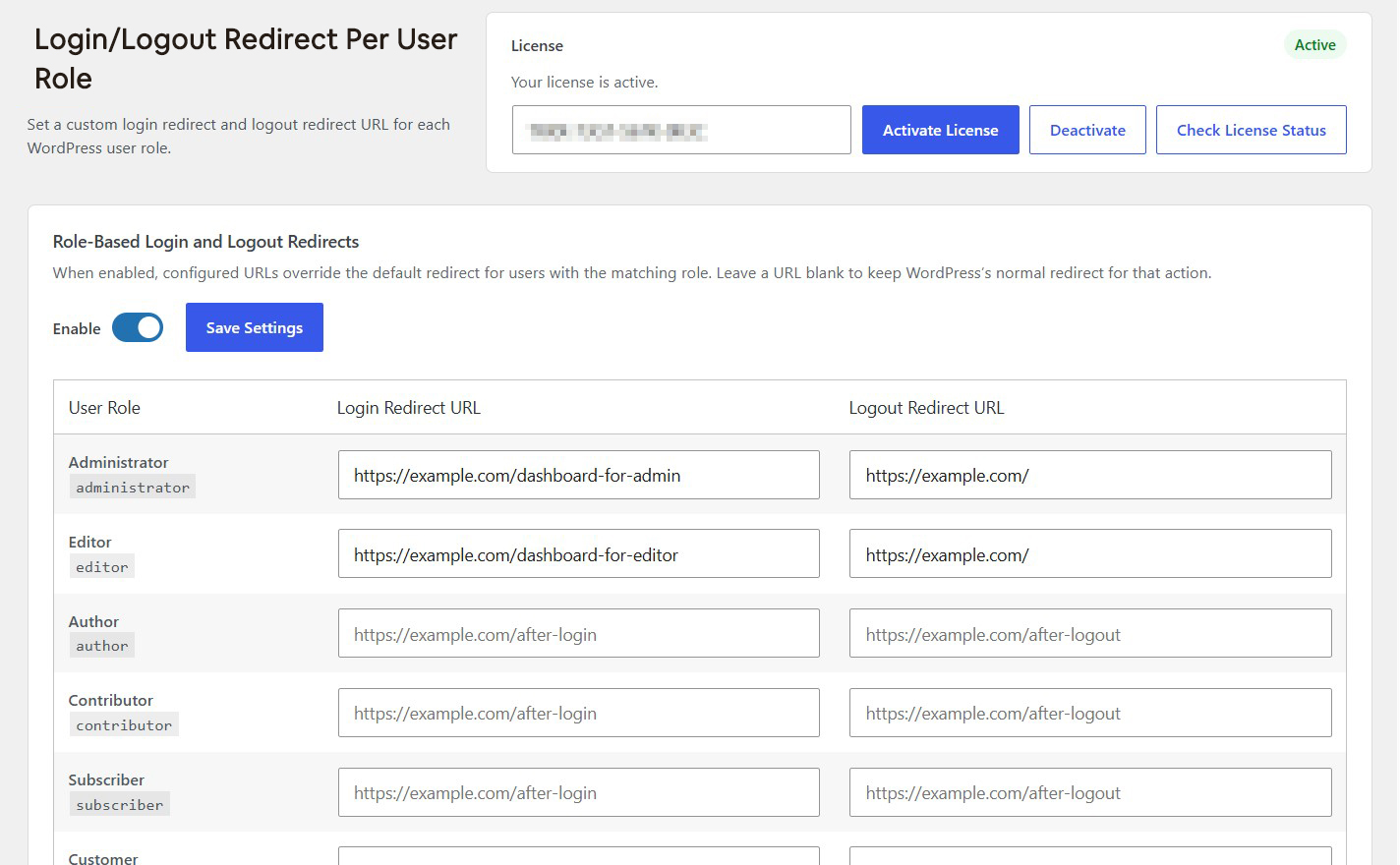
Login/Logout Redirect Per User Role gives you complete control over where users are redirected after logging in or logging out of your WordPress website.
Instead of sending everyone to the same destination, you can configure custom login and logout redirect URLs for each WordPress user role.
For example, administrators can be redirected to a dedicated dashboard, editors to their content management area, and subscribers or customers to a personalized page. You can also choose a different destination for each role after logout.
The plugin provides a centralized settings page where you can configure redirect URLs for individual user roles. When enabled, your configured URLs override WordPress’s default redirect destinations for users with matching roles.
Prefer to keep the normal WordPress behavior for a particular action? Simply leave its URL field empty.
Easy to configure and lightweight, Login/Logout Redirect Per User Role is ideal for membership websites, online stores, multi-user platforms and any WordPress website that needs more control over user navigation.
Key Features
- Set custom login redirect URLs for individual user roles
- Set custom logout redirect URLs for individual user roles
- Configure separate destinations for every user role
- Support standard WordPress user roles
- Support custom user roles registered by plugins
- Override WordPress's default login and logout redirects
- Leave individual URL fields blank to retain default WordPress behavior
- Enable or disable role-based redirects whenever needed
- Manage all settings from one centralized administration screen
- Lightweight with no external services required
Frequently Asked Questions
Can I set different login redirect URLs for different user roles?
Yes. You can configure a separate login redirect URL for each WordPress user role. For example, administrators can be sent to an administration dashboard while customers are redirected to their account page.
Can I configure different logout redirect URLs as well?
Yes. The plugin allows you to specify a separate logout redirect URL for each user role, independently of its login redirect URL.
Which WordPress user roles are supported?
The plugin supports standard WordPress roles, including Administrator, Editor, Author, Contributor and Subscriber. It can also support custom roles registered by other plugins.
What happens if I leave a redirect URL field empty?
If a login or logout URL field is left empty, WordPress’s normal redirect behavior is retained for that particular action and user role.
Can I redirect administrators to a custom dashboard after login?
Yes. Simply enter your preferred dashboard URL in the Administrator row under Login Redirect URL.
Does the plugin change the default redirect behavior for all users?
Only when the plugin is enabled and a custom redirect URL has been configured for the user’s matching role and action. Empty URL fields retain the normal WordPress redirect behavior.
Can I temporarily disable all custom redirects?
Yes. You can disable the Role-Based Login and Logout Redirects setting from the plugin’s administration page. This removes the plugin’s custom redirect behavior until you enable it again.
Do I need to configure both login and logout redirects?
No. Login and logout redirects are configured independently. You can customize only login redirects, only logout redirects, or both.
Related Plugins

Hide WP-Login Page From Public
Hide your default WordPress login page and redirect visitors to your homepage while keeping a private login URL for administrators.

Force Logout User
Log out individual users or invalidate all active user login sessions across your WordPress website with one click.

Block This Email & Domain
Prevent unwanted email addresses and entire domains from registering, logging in or submitting forms.