
Hide Dashboard From Users
Restrict dashboard access for selected WordPress user roles.
Keep your WordPress dashboard accessible to the people who need it. Prevent selected user roles from accessing the WordPress admin area and redirect them to the front end of your website instead.
A simple way to create a cleaner experience for customers, members, and other non-administrator users.
Key highlights:
- Restrict dashboard access for selected user roles.
- Redirect restricted users to a chosen front-end page.
- Keep administrator access available.
- Simplify access management for membership and customer websites.
- Lightweight and easy to configure.
Choose Your License
1 Year / 1 Site
Use on 1 website for 1 year.
$1.99
1 Year / 10 Sites
Use on up to 10 websites for 1 year.
$6.99
Lifetime / 1 Site
One time payment. Use on 1 website forever.
$5.99
Secure Checkout
Instant Download
24/7 Email Support
Plugin Details
| Version | 1.0.1 |
| Total File Size | 55.6 KB |
| Last Updated | Oct 28, 2026 |
| Requires WordPress | 6.0+ |
| Requires PHP | 7.4+ |
| Compatible With | WordPress, WooCommerce, Elementor & Contact Form 7 |
| Support | 24/7 Email Support |
Hide the WordPress Dashboard
Redirect selected users away from the WordPress Dashboard to prevent access to the standard dashboard screen.
Non-Administrator Control
Keep the dashboard available to administrators and other exempt roles while redirecting other users.
Custom Redirect URL
Choose exactly where users should be sent when they attempt to access the WordPress Dashboard.
Protect the Admin Experience
Keep your WordPress administration area focused on users who need dashboard access.
Simple Configuration
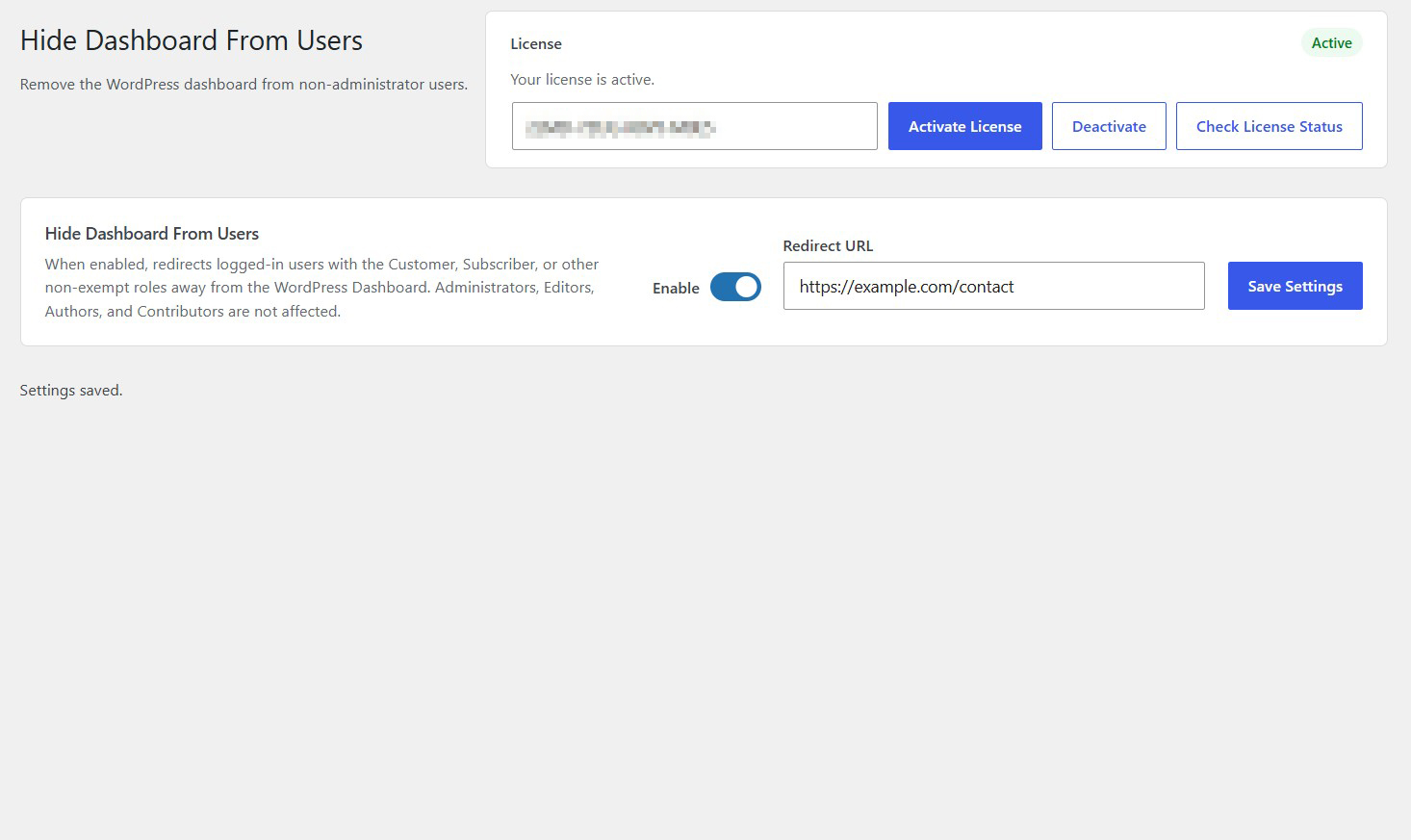
Enable dashboard restrictions and enter your preferred redirect destination from one settings screen.
Flexible User Management
Control dashboard access without changing user roles, permissions or existing account settings.
Description
Hide Dashboard From Users gives you control over which users can access the WordPress Dashboard.
By default, WordPress provides dashboard access to users according to their assigned roles and capabilities. With this plugin, you can redirect selected non-administrator users away from the standard dashboard screen to a destination of your choice.
When enabled, users with the Customer, Subscriber and other non-exempt roles are automatically redirected whenever they attempt to access the WordPress Dashboard.
Administrators, Editors, Authors and Contributors are not affected by the default configuration, allowing them to continue using the dashboard normally.
You can also specify a custom Redirect URL, such as a contact page, account page or custom landing page, where redirected users will be sent.
The plugin does not change user roles, permissions or account capabilities. It simply controls access to the standard WordPress Dashboard by redirecting selected users to your chosen destination.
Easy to configure and lightweight, Hide Dashboard From Users is ideal for membership websites, online stores and WordPress platforms where not every user needs access to the administration dashboard.
Key Features
- Redirect selected non-administrator users away from the WordPress Dashboard
- Configure a custom redirect URL
- Keep Administrators exempt from dashboard restrictions
- Editors, Authors and Contributors remain unaffected by the default configuration
- Supports Customer, Subscriber and other non-exempt roles
- Redirect users automatically when they attempt to access the Dashboard
- No need to modify user roles or permissions
- Simple enable and disable functionality
- Manage settings from one convenient administration screen
- Lightweight with no external services or API keys required
Frequently Asked Questions
What does Hide Dashboard From Users do?
The plugin redirects selected non-administrator users away from the standard WordPress Dashboard when they attempt to access it. You can specify the destination URL where these users should be redirected.
Which users are affected by the plugin?
By default, the plugin redirects users with the Customer, Subscriber and other non-exempt roles. Administrators, Editors, Authors and Contributors are not affected.
Can I choose where redirected users are sent?
Yes. The plugin includes a Redirect URL setting where you can enter your preferred destination. For example, you can redirect users to your homepage, contact page, account page or a custom landing page.
Will administrators still have access to the WordPress Dashboard?
Yes. Administrators are exempt from the default dashboard restrictions and can continue accessing the WordPress Dashboard normally.
Does the plugin remove user permissions or change user roles?
No. The plugin does not modify user roles, capabilities or account permissions. It only redirects selected users away from the standard WordPress Dashboard.
Can WooCommerce customers be redirected away from the Dashboard?
Yes. WooCommerce customers are among the supported user roles. When the plugin is enabled, customers are redirected to your configured destination when attempting to access the WordPress Dashboard.
Does the plugin prevent users from accessing the front end of my website?
No. The plugin only controls access to the standard WordPress Dashboard. Users can continue browsing your website normally.
Can I temporarily disable dashboard restrictions?
Yes. You can disable the plugin functionality from its settings page. Once disabled, the plugin stops applying its custom dashboard redirects.
What happens if I leave the Redirect URL empty?
The plugin is designed to use a configured destination for its redirect functionality. Enter a valid URL to ensure affected users are redirected to the intended page.
Related Plugins
Hide Admin Bar From Specific Roles
Hide the WordPress admin toolbar from selected user roles to create a cleaner front-end experience.

Login/Logout Redirect Per User Role
Configure custom login and logout redirect URLs for individual WordPress user roles.
Force Logout User
Log out individual users or invalidate all active user login sessions across your WordPress website with one click.