

Export All User Emails
Export your WordPress users’ email addresses in just one click.
Quickly collect email addresses from your WordPress user database and export them into a convenient CSV file. Whether you’re managing a membership website, an online store, or a growing community, get the email list you need without manually copying addresses one by one.
A simple, practical tool for exporting user email addresses directly from WordPress.
Key highlights:
- Export user email addresses to CSV.
- Quickly collect email addresses from registered WordPress users.
- Avoid copying addresses manually.
- Generate a file you can open in spreadsheet applications.
- Simple, lightweight, and easy to use.
Choose Your License
1 Year / 1 Site
Use on 1 website for 1 year.
$1.99
1 Year / 10 Sites
Use on up to 10 websites for 1 year.
$6.99
Lifetime / 1 Site
One time payment. Use on 1 website forever.
$9.99
Secure Checkout
Instant Download
24/7 Email Support
Plugin Details
| Version | 1.0.0 |
| Total File Size | 48.2 KB |
| Last Updated | Oct 28, 2026 |
| Requires WordPress | 6.0+ |
| Requires PHP | 7.4+ |
| Compatible With | WordPress, WooCommerce, Elementor & Contact Form 7 |
| Support | 24/7 Email Support |
Export All User Emails
Export email addresses from all registered WordPress user accounts into a single CSV file.
One-Click CSV Download
Generate and download your user email list with a single click.
All User Roles Included
Collect email addresses from registered users across your WordPress website, regardless of their assigned role.
Excel Compatible
Open your exported CSV file easily with Microsoft Excel, Google Sheets and other spreadsheet applications.
Simple Data Management
Get a convenient list of registered user email addresses without manually browsing individual user profiles.
No External Services
Generate CSV exports directly within WordPress without relying on external APIs or third-party services.
Description
Export All User Emails makes it easy to collect and download email addresses from all registered user accounts on your WordPress website.
Instead of manually visiting the Users page and copying email addresses one by one, you can generate a complete email list with a single click.
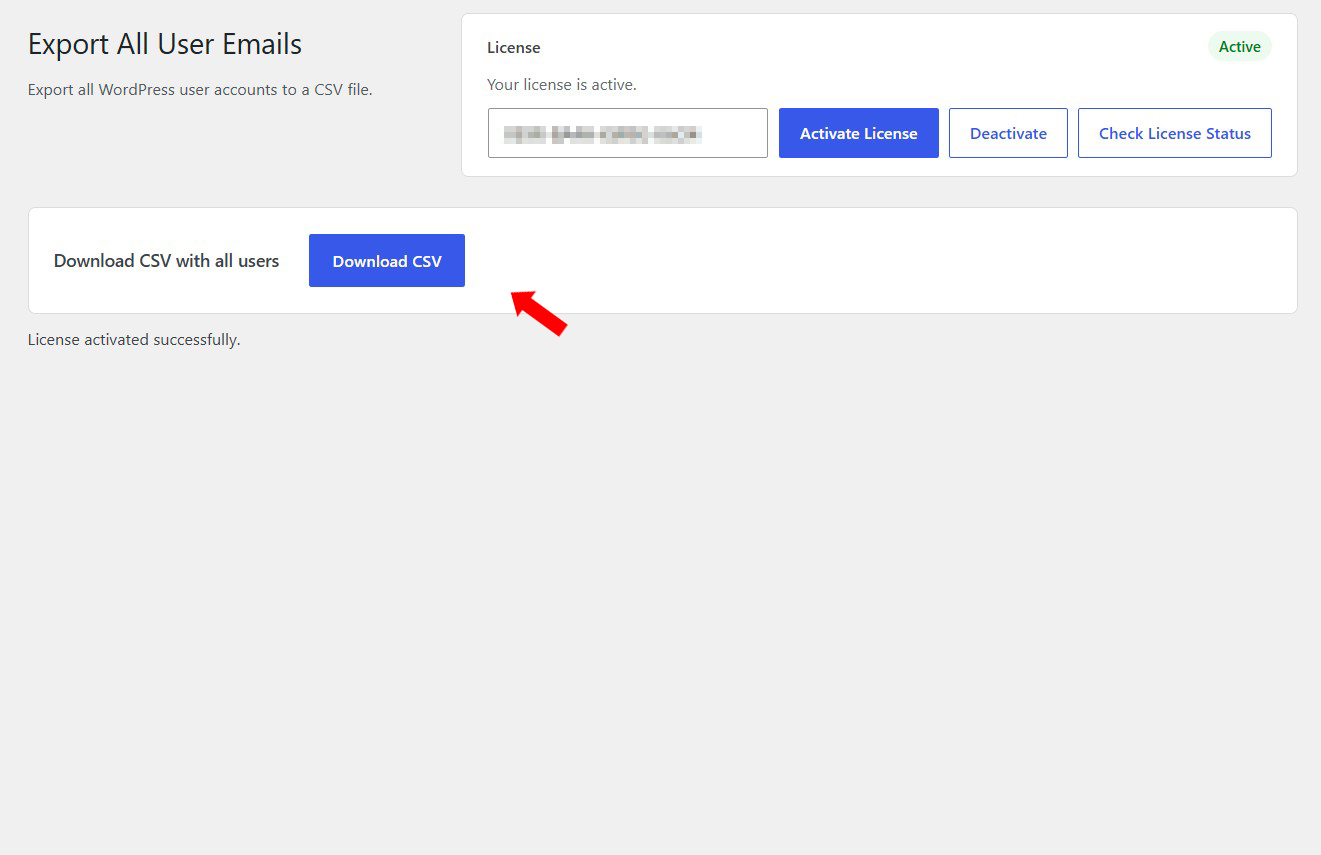
Simply open the plugin settings page and click the Download CSV button. The plugin generates a CSV file containing the email addresses associated with your registered WordPress user accounts.
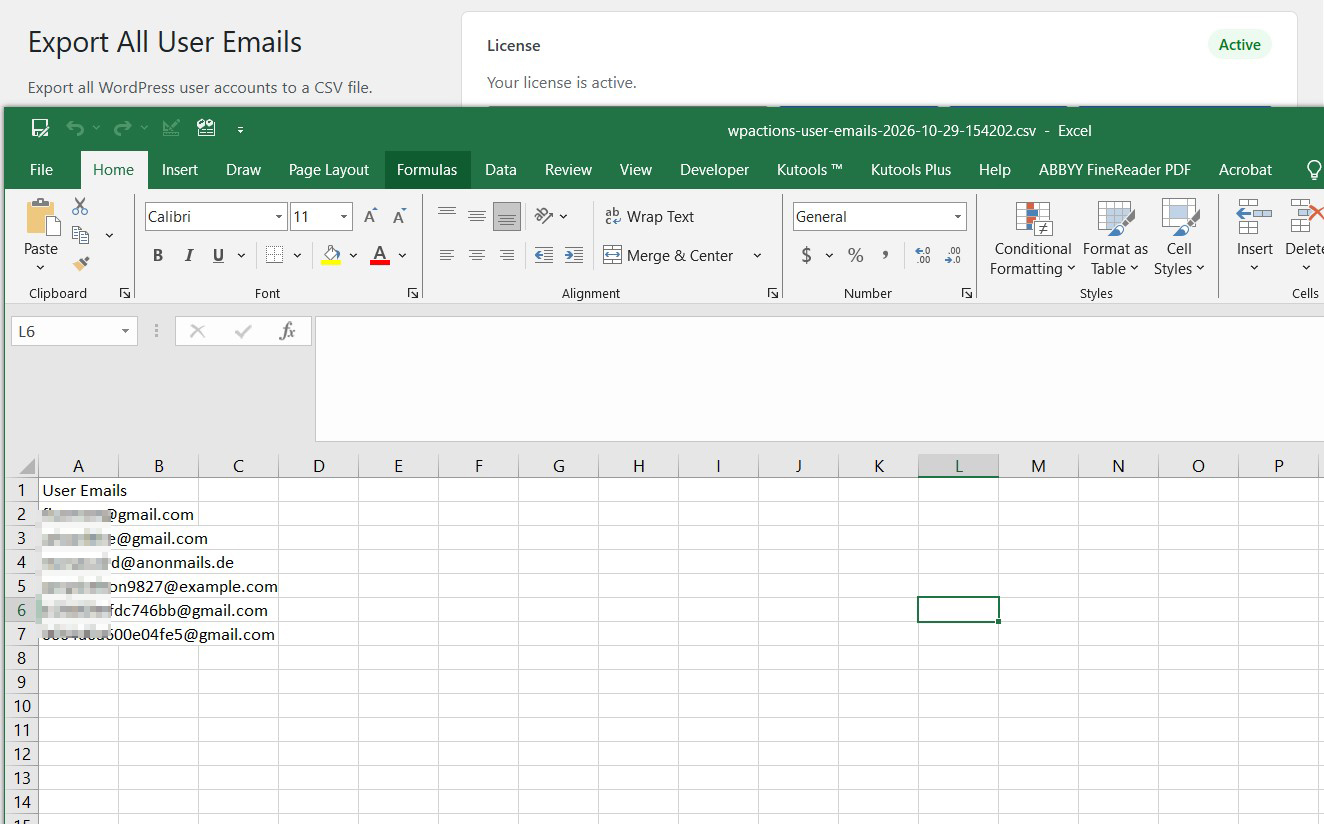
Your exported file can be opened with Microsoft Excel, Google Sheets or any other application that supports CSV files, making it easy to organize, review and manage your user email data.
Whether you manage a membership website, an online store, a community platform or a standard WordPress website, Export All User Emails provides a quick and convenient way to retrieve your registered users’ email addresses.
Lightweight and easy to use, the plugin requires no complicated configurations, external services or API connections.
Key Features
- Export email addresses from all registered WordPress user accounts
- Generate a CSV file with a single click
- Include users across different WordPress roles
- Download the complete email list directly from WordPress
- Compatible with Microsoft Excel and Google Sheets
- Simple and straightforward export process
- No need to copy email addresses manually
- No external APIs or third-party services required
- Lightweight and easy to use
Frequently Asked Questions
What does Export All User Emails do?
The plugin collects email addresses associated with registered WordPress user accounts and allows you to download them in a CSV file.
How do I export my users' email addresses?
Simply navigate to the plugin settings page and click the Download CSV button. Your email list will be generated and downloaded as a CSV file.
Does the export include users with different WordPress roles?
Yes. The plugin exports email addresses from registered user accounts across your WordPress website, regardless of their assigned role.
Can I open the exported CSV file in Microsoft Excel?
Yes. The exported CSV file is compatible with Microsoft Excel, Google Sheets and other spreadsheet applications that support CSV files.
Does the exported file contain anything other than email addresses?
The export is designed to contain user email addresses in a simple, single-column CSV format, making the resulting list easy to work with.
Does the plugin modify or delete any user accounts?
No. The plugin only reads registered user email addresses and generates a downloadable CSV file. It does not modify, delete or otherwise change user accounts.
Do I need an external service or API to export my email list?
No. The plugin generates the CSV file directly within WordPress without requiring external services or API connections.
Can I use the exported email addresses for email marketing?
The plugin provides an export of registered user email addresses. However, having an email address does not automatically mean you have permission to send marketing communications to that person. Make sure your use of the exported data complies with applicable privacy and data protection requirements, including GDPR where applicable.
Can I export the email list more than once?
Yes. You can generate and download a new CSV file whenever needed to retrieve the email addresses currently associated with your registered WordPress user accounts.
Related Plugins

Export Users to CSV
Export WordPress user information into a CSV file for convenient data management and spreadsheet processing.

New User Report
Get a convenient overview of newly registered users on your WordPress website.

Add User Registration Date Column to Users
Display user registration dates directly in your WordPress Users table.