

Change WordPress Email Sender
Customize the sender name and email address used by WordPress emails.
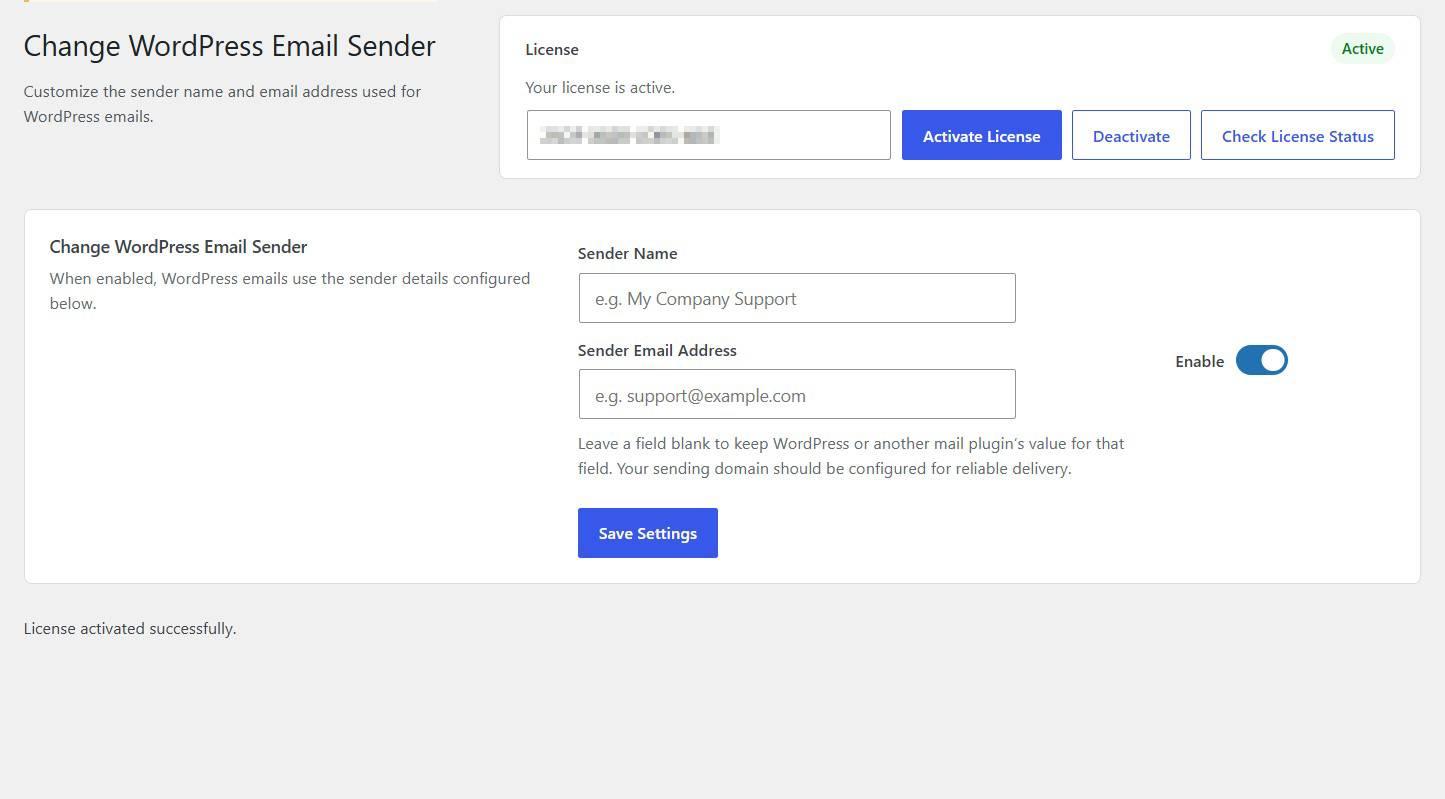
Give your WordPress emails a more professional identity. Change WordPress Email Sender lets you customize the sender name and sender email address used for outgoing WordPress emails, helping your website communicate with a consistent brand identity.
Key highlights:
- Customize the outgoing email sender name
- Set your preferred sender email address
- Create a consistent email identity for your website
- Reduce reliance on the default WordPress sender details
- Simple configuration without unnecessary features
Choose Your License
1 Year / 1 Site
Use on 1 website for 1 year.
$0.99
1 Year / 10 Sites
Use on up to 10 websites for 1 year.
$6.99
Lifetime / 1 Site
One time payment. Use on 1 website forever.
$6.99
Secure Checkout
Instant Download
24/7 Email Support
Plugin Details
| Version | 1.0.1 |
| Total File Size | 53.5 KB |
| Last Updated | Oct 28, 2026 |
| Requires WordPress | 6.0+ |
| Requires PHP | 7.4+ |
| Compatible With | WordPress, WooCommerce, Elementor & Contact Form 7 |
| Support | 24/7 Email Support |
Customize Email Sender Name
Replace the default WordPress sender name with your preferred business or website name.
Set a Custom Sender Email Address
Choose the email address displayed as the sender of your outgoing WordPress emails.
Professional Email Branding
Give your WordPress notifications a consistent business identity instead of using generic default sender details.
Independent Sender Field Controls
Customize the sender name and email address independently, without requiring both fields to be changed.
Flexible Email Configuration
Leave either field blank to preserve the sender value configured by WordPress or another compatible mail plugin.
One-Click Enable or Disable
Activate or deactivate your custom sender details whenever you need.
Description
Change WordPress Email Sender is a lightweight WordPress plugin that allows you to customize the sender name and email address used for outgoing WordPress emails.
By default, WordPress uses generic sender information when sending system notifications and other outgoing emails. This may not always reflect your business identity or the professional image you want to present to your website visitors and customers.
This plugin gives you control over those details by allowing you to specify your preferred sender name and sender email address.
Instead of displaying a generic WordPress sender identity, your outgoing emails can use your company name, website name or support department as the sender.
You can also specify the email address you want recipients to see, helping maintain consistent branding across your website’s email communications.
The plugin provides two independent fields:
Sender Name: Define the name displayed as the sender.
Sender Email Address: Specify the email address used as the sender.
You can customize either field independently. If you leave a field blank, the plugin preserves the sender value provided by WordPress or another compatible mail plugin for that field.
The settings are simple and straightforward, with no complicated configuration required.
Simply enter your preferred sender details, enable the plugin and save your settings.
For reliable email delivery, make sure your sending domain is properly configured and authorized through your email provider.
Whether you operate a business website, an online store, a membership platform or a professional service website, Change WordPress Email Sender helps make your outgoing emails more consistent with your brand.
Take control of your WordPress email identity with simple, flexible sender customization.
Key Features
- Customize the default WordPress email sender name
- Set a custom outgoing sender email address
- Independently configure sender name and email address
- Replace generic WordPress sender information
- Maintain consistent business email branding
- Leave individual fields blank to preserve existing sender values
- Work alongside compatible mail configuration plugins
- Simple centralized settings screen
- Enable or disable custom sender details whenever needed
- No need to modify WordPress core files
- Lightweight and easy to use
- No external services or API keys required
Frequently Asked Questions
Can I change the default WordPress sender name?
Yes. You can replace the default sender name with your preferred business name, website name or support department.
Can I use a custom sender email address?
Yes. You can specify the email address you want WordPress to use as the sender of outgoing emails.
Do I have to change both sender fields?
No. The sender name and sender email address can be configured independently. You can customize either field without requiring the other.
What happens if I leave a field blank?
The plugin preserves the sender value provided by WordPress or another compatible mail plugin for that particular field.
Does it work with WooCommerce?
It can customize sender details for WooCommerce emails that use the standard WordPress email functions, subject to compatibility with other email customization plugins.
Does it change the recipient email address?
No. The plugin customizes sender information, not the recipient of outgoing emails.
Can I use my company's support email address?
Yes. You can enter an appropriate business email address, such as [email protected], as your custom sender address.
Does it require an SMTP plugin?
No. However, you can use it alongside a compatible SMTP plugin or email delivery service.
Does it modify WordPress core files?
No. It works through WordPress functionality without requiring modifications to core files.
Can I disable the custom sender settings?
Yes. You can disable the plugin functionality and restore the normal sender configuration.
Does the plugin require external services?
No. It works directly within your WordPress installation without external services or API keys.
Related Plugins

Disable All Emails
Temporarily suppress outgoing WordPress emails with one simple setting.

Disable Plugin Notifications
Hide plugin-generated administration notices throughout your WordPress dashboard.

Disable Admin Notices
Hide standard WordPress administration notices and maintain a cleaner dashboard.