
Post Status Changer
Change WordPress post statuses quickly and easily
Need to move a post from Draft to Published, return an article to Draft, or update the status of existing content? Manage post statuses directly from your WordPress dashboard without opening every post individually.
A simple, practical tool for bloggers, publishers, and website managers who want more control over their content workflow.
Key highlights:
- Change WordPress post statuses more conveniently.
- Simplify everyday content management.
- Manage publishing workflows with fewer clicks.
- Keep your existing post content intact.
- Save time when updating multiple pieces of content.

Choose Your License
1 Year / 1 Site
Use on 1 website for 1 year.
$1.99
1 Year / 10 Sites
Use on up to 10 websites for 1 year.
$9.99
Lifetime / 1 Site
One time payment. Use on 1 website forever.
$9.99
Secure Checkout
Instant Download
24/7 Email Support
Plugin Details
| Version | 1.0.0 |
| Total File Size | 51.4 KB |
| Last Updated | Oct 28, 2026 |
| Requires WordPress | 6.0+ |
| Requires PHP | 7.4+ |
| Compatible With | WordPress, WooCommerce, Elementor & Contact Form 7 |
| Support | 24/7 Email Support |
Change Post Status in Bulk
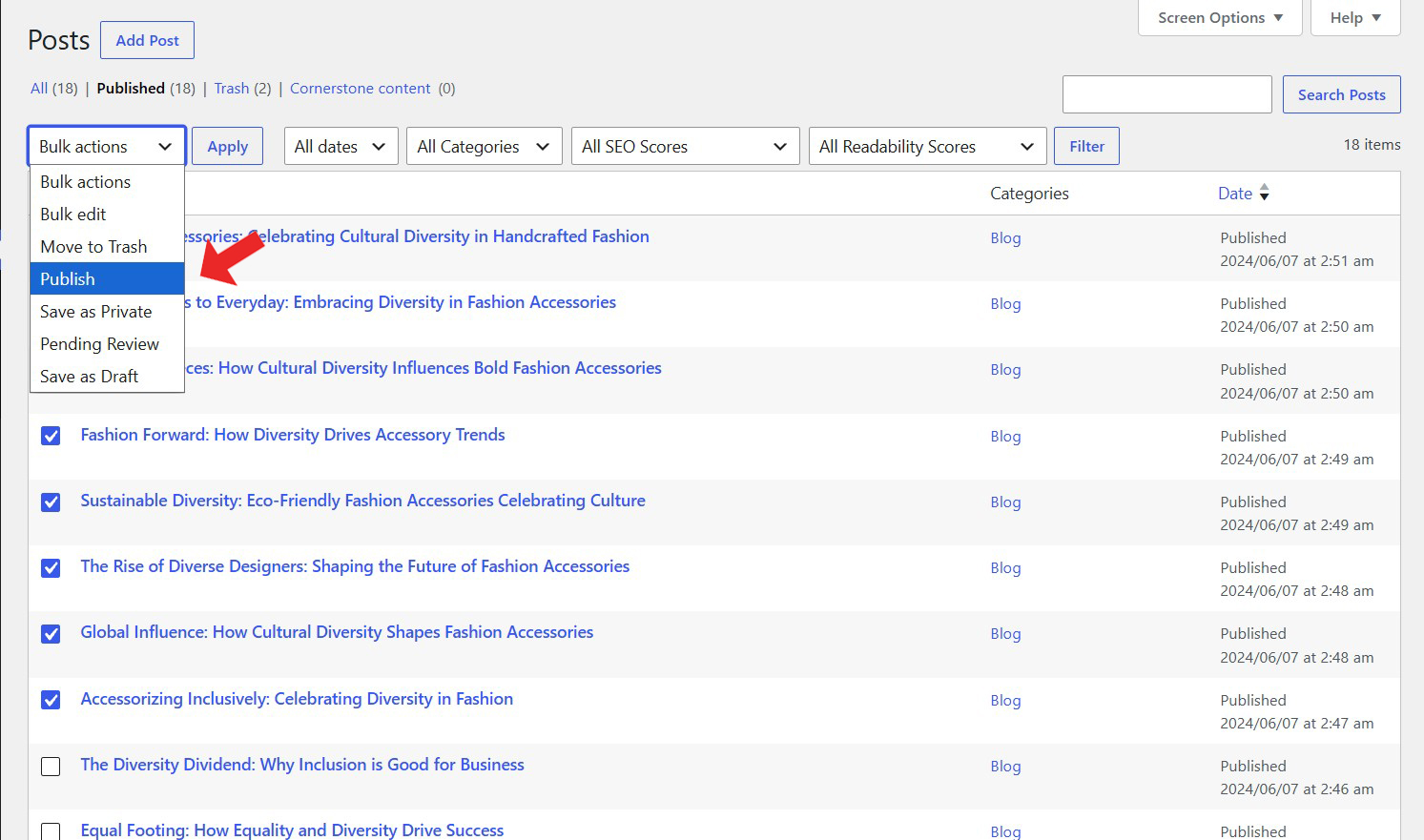
Update the status of multiple WordPress posts simultaneously from your Posts list.
Publish Multiple Posts
Publish selected posts with a single bulk action, making content management faster and easier.
Save Posts as Draft
Move selected posts back to Draft status whenever you need to postpone publication or make further edits.
Set Posts to Pending Review
Move multiple posts to Pending Review for editorial checks and approval before publication.
Save Posts as Private
Change selected posts to Private so their content is restricted to authorized users.
Simple Bulk Management
Choose your desired status directly from the WordPress Posts bulk actions menu without editing posts individually.
Description
Post Status Changer makes it easy to update the publication status of multiple WordPress posts at once, directly from your Posts administration screen.
Instead of opening posts individually to change their status, you can select multiple posts and apply the desired action through the familiar WordPress Bulk Actions menu.
Choose from four convenient options:
Publish: Make selected posts publicly available.
Save as Private: Restrict selected posts to authorized users.
Pending Review: Submit selected posts for editorial review.
Save as Draft: Move selected posts back to draft status for further editing.
Once you select the posts and choose the desired action, the plugin processes the changes in bulk, saving you time and simplifying your publishing workflow.
The plugin also respects WordPress user permissions. Only posts you have permission to edit can be changed.
Whether you manage a blog, an editorial team or a content-heavy website, Post Status Changer provides a convenient way to organize and manage your publishing workflow.
Lightweight and easy to use, it integrates directly into your existing WordPress Posts screen without complicated configuration or external services.
Key Features
- Change the status of multiple WordPress posts simultaneously
- Publish selected posts in bulk
- Save selected posts as Private
- Move selected posts to Pending Review
- Save selected posts as Draft
- Integrated directly into the WordPress Bulk Actions menu
- No need to edit posts individually
- Respects WordPress user editing permissions
- Simple enable and disable functionality
- Lightweight and easy to use
- No external services or API keys required
Frequently Asked Questions
What does Post Status Changer do?
The plugin allows you to change the publication status of multiple WordPress posts simultaneously through the Bulk Actions menu on your Posts administration screen.
Which post statuses can I choose?
The plugin provides four available actions: Publish, Save as Private, Pending Review and Save as Draft.
How do I change the status of multiple posts?
Navigate to Posts in your WordPress dashboard, select the posts you want to update using their checkboxes, choose your desired action from the Bulk Actions dropdown and click Apply.
Can I publish multiple posts at once?
Yes. Select the posts you want to publish, choose Publish from the Bulk Actions menu and click Apply.
Can I move published posts back to Draft?
Yes. You can select published posts and use Save as Draft to move them back to draft status.
What does Pending Review mean?
Pending Review marks selected posts as awaiting editorial review or approval before publication.
What happens when I save posts as Private?
The selected posts are changed to Private status, restricting access to authorized WordPress users rather than making them publicly available.
Can I change the status of just one post?
Yes. Simply select one post and apply your desired status using the same bulk action process.
Will the plugin modify my post content?
No. The plugin changes the post status without requiring you to edit the post content.
Can every WordPress user change post statuses?
Only posts that the current user has permission to edit can be changed. WordPress user capabilities determine which posts can be updated.
Does the plugin work directly from the WordPress Posts list?
Yes. All available status actions are integrated into the standard Posts Bulk Actions menu.
Do I need any external services or API keys?
No. The plugin works directly within WordPress and does not require external services or third-party API connections.
Related Plugins

Change Post Author
Reassign WordPress posts to different authors individually or in bulk, directly from your Posts administration screen.

Duplicate Post
Create copies of existing WordPress posts with one click, preserving their content and associated information.

Duplicate Page
Create copies of existing WordPress pages with one click, making it easier to reuse layouts and page content.